Before you start
- Your download is a zip with two files. Double-click it to open it. Start with the one marked with examples to see how everything works, then use the blank one for your business.
- Open the file in Microsoft Excel. Using Google Sheets? Upload it to Google Drive, then open it with Google Sheets.
- Start on the Start Here tab. It has the same steps, right inside the file.
- The sample data is there so you can see how everything works. Type over it with your own when you're ready.
Here's how to go from a new file to a priced, printable quote. Setup takes about 15 minutes, once. After that, a job takes about 2 minutes.
1Set up your rates (one time, about 15 minutes)

- Open My Rates. Add your business details, pay per detailer hour, overhead, target margin and lowest price.
- Fill in the mobile section: trip fee, driving cost per mile, drive-time pay and generator fuel and water per hour.
- Set your package times by vehicle size and the product cost per package. Time a few of your own details and change them.
- Check condition, pet hair and add-ons. Every number is yours to change.
2Quote a job
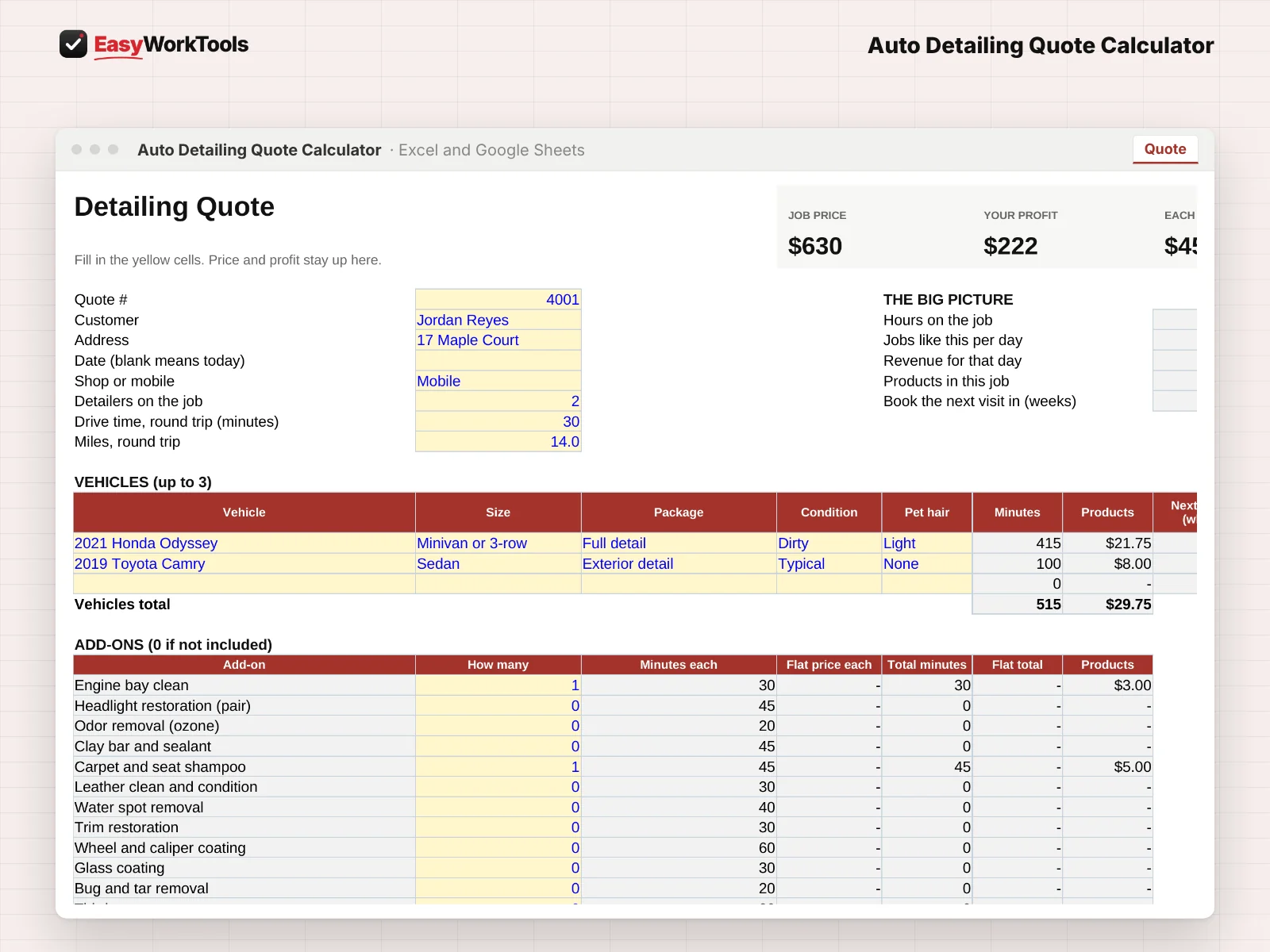
- Open Quote. Enter the customer, pick Shop or Mobile, and add up to 3 vehicles.
- For each vehicle pick size, package, condition and pet hair. Add any add-ons.
- Read the top: job price, profit and what each hour earns.
3Show options and hand out your menu
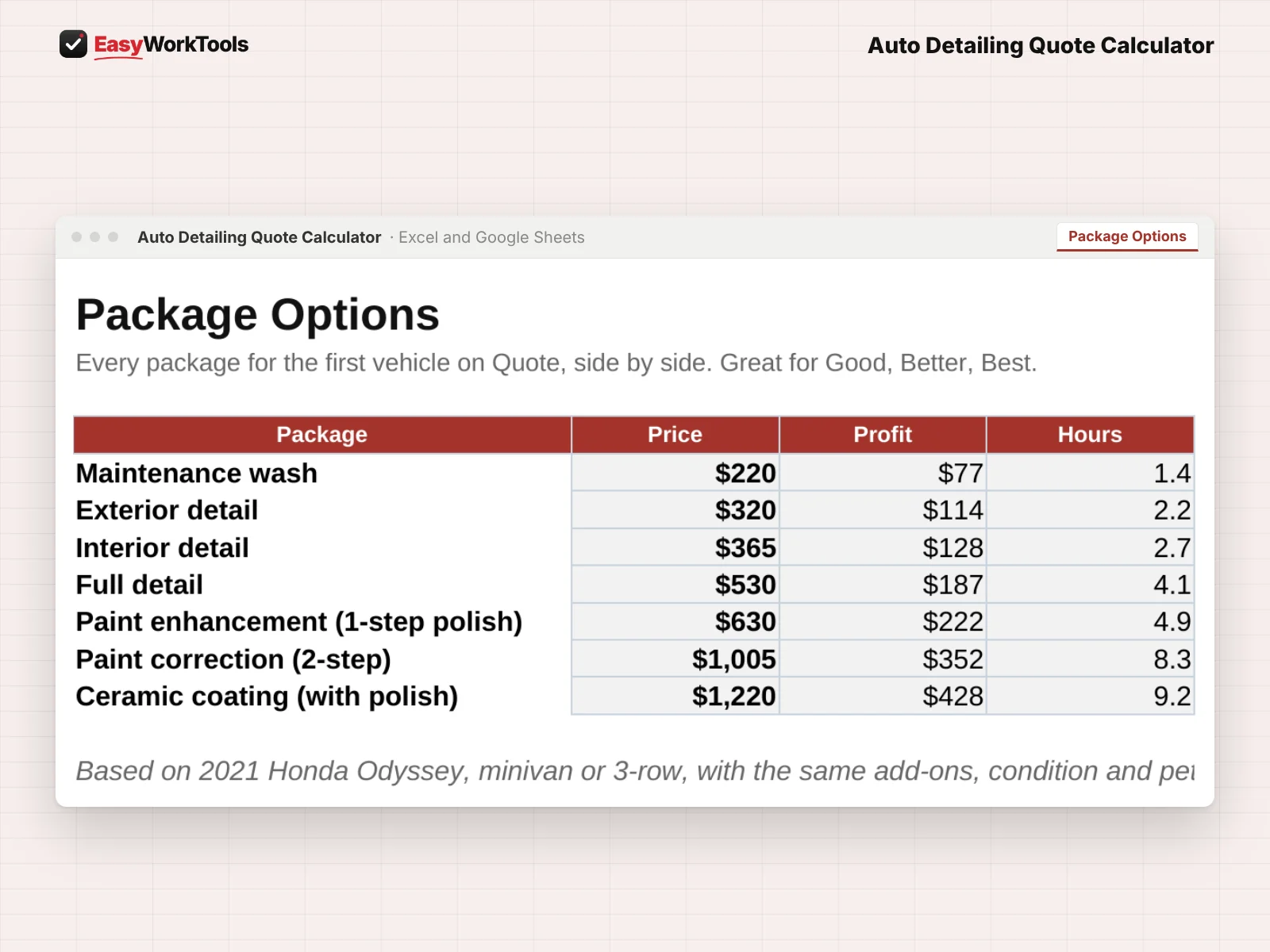
- Package Options shows every package for the first vehicle side by side.
- Price Menu prints your starting prices for every package and size. Customer Quote prints this job.
What the messages mean
The tool watches your numbers and tells you in plain words when something needs a look. Here's every message you might see.
What to do: Charge at least the price shown.
What to do: Pick one.
What to do: Pick one.
What to do: Add a detailer or split it over two days.
What to do: Pick it from the list.
Using Google Sheets or your phone
- To use Google Sheets, upload the file to Google Drive, then right-click it and choose Open with, then Google Sheets.
- Dropdowns, colors, and every calculation work the same in Google Sheets.
- On a phone, the Google Sheets and Excel apps work for quick changes. For setup and printing, a computer is easier.
- Want to start fresh? Type over the yellow example cells. Don't delete rows, since other tabs may be reading them.
Ready when you are
Like what you see? Get the detailing quote calculator for $19, with every future update free. Want to try the math first? The free version covers the basics, no sign-up. Need more than one tool? Save with the toolkit.
Common questions
Does pet hair change the price?
Yes. Light and heavy pet hair add time, and the price follows.
Can I charge a flat price for an add-on?
Yes. Enter a flat price on My Rates and it's added as-is.
Quick reference from the Start Here tab
Welcome
A full detail on a sandy, dog-hair-covered minivan isn't the same job as one on a garage-kept sedan. This calculator prices every vehicle by size, package, condition and pet hair, adds your add-ons, shop or mobile costs and products, and shows your profit and what each hour really earns before you quote.
Setup (About 15 Minutes, One Time)
Open 'My Rates'. Add your business info and your costs: detailer pay, overhead, target margin, lowest price and your mobile costs.
Fill in the package times: minutes for one detailer, for each package and vehicle size. Time a few of your own details and change them. The examples are placeholders, not advice.
Check product cost per package, condition and pet hair settings, and your add-ons.
New to pricing? Read 'Pricing Help' first.
Quoting A Job (About 2 Minutes)
Open 'Quote'. Enter the customer, pick Shop or Mobile, and add up to 3 vehicles with size, package, condition and pet hair.
Turn on any add-ons and say how many.
Read the top: job price, profit and what each hour earns.
'Package Options' shows every package for the first vehicle side by side. Print 'Customer Quote', or hand out 'Price Menu'.
Handy Tips
Price the condition you see, not the one the customer describes. Ask for photos before mobile jobs.
Paint correction and ceramic coating are where profit lives, and where underquoting hurts most. Time them carefully.
Using Google Sheets? Upload this file to Google Drive and open it with Google Sheets. The math works the same there. Locks don't carry over to Google Sheets, so type only in the yellow cells, and print with File > Print.
Your License
This file is licensed to one business, including everyone who works there. Please don't share, resell or post it online.
© 2026 EasyWorkTools. All rights reserved. easyworktools.com
Every tab
This file has 7 tabs, in this order:
- Start Here
- Quote
- Package Options
- Price Menu
- Customer Quote
- My Rates
- Pricing Help