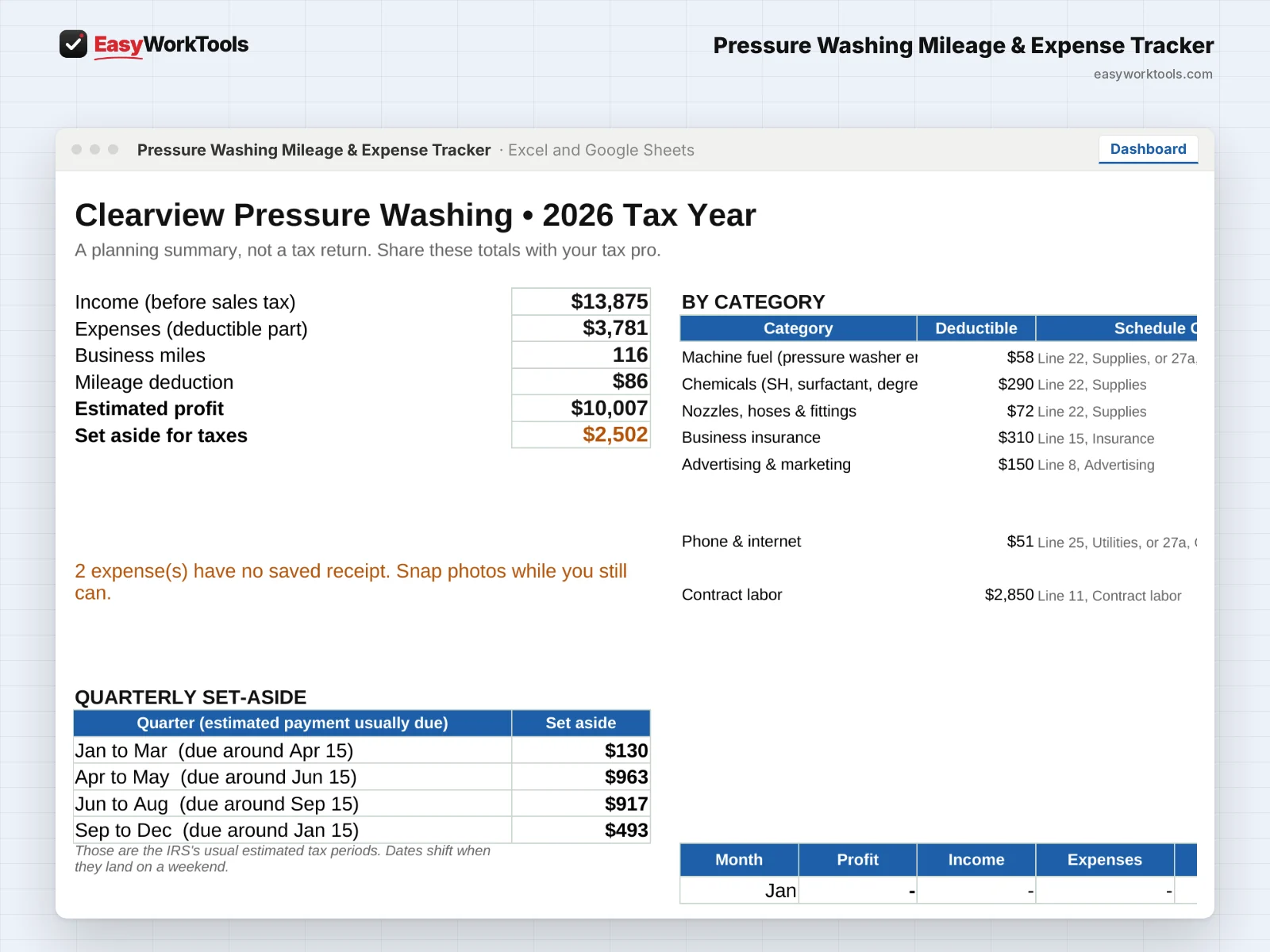
Pressure Washing Mileage & Expense Tracker Dashboard tab in Excel and Google Sheets. The tax year dashboard with income, deductions, mileage, and what to set aside.
The tax year dashboard with income, deductions, mileage, and what to set aside.
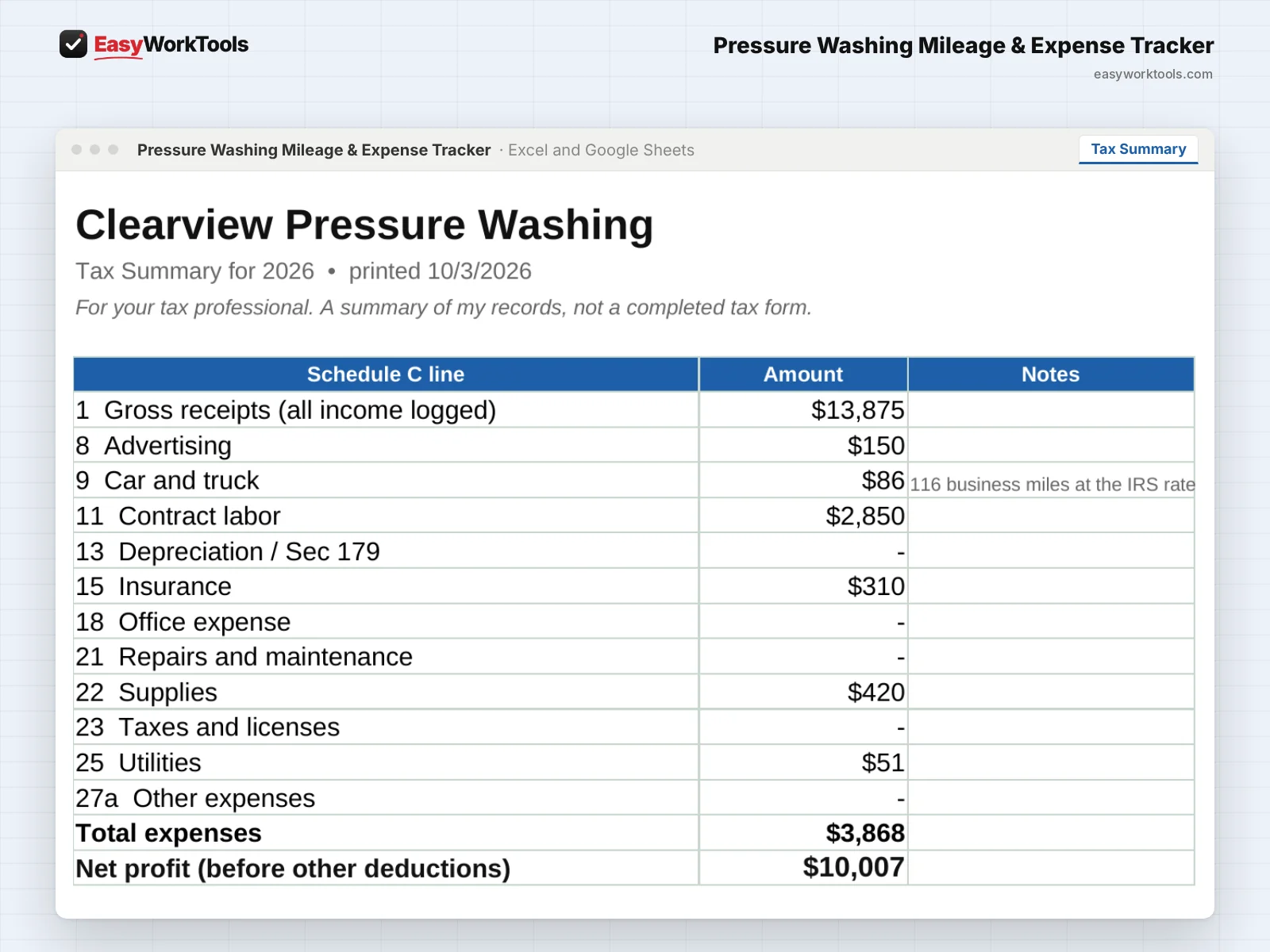
Pressure Washing Mileage & Expense Tracker Tax Summary tab in Excel and Google Sheets. The Tax Summary, organized by Schedule C line and ready for your tax pro.
The Tax Summary, organized by Schedule C line and ready for your tax pro.
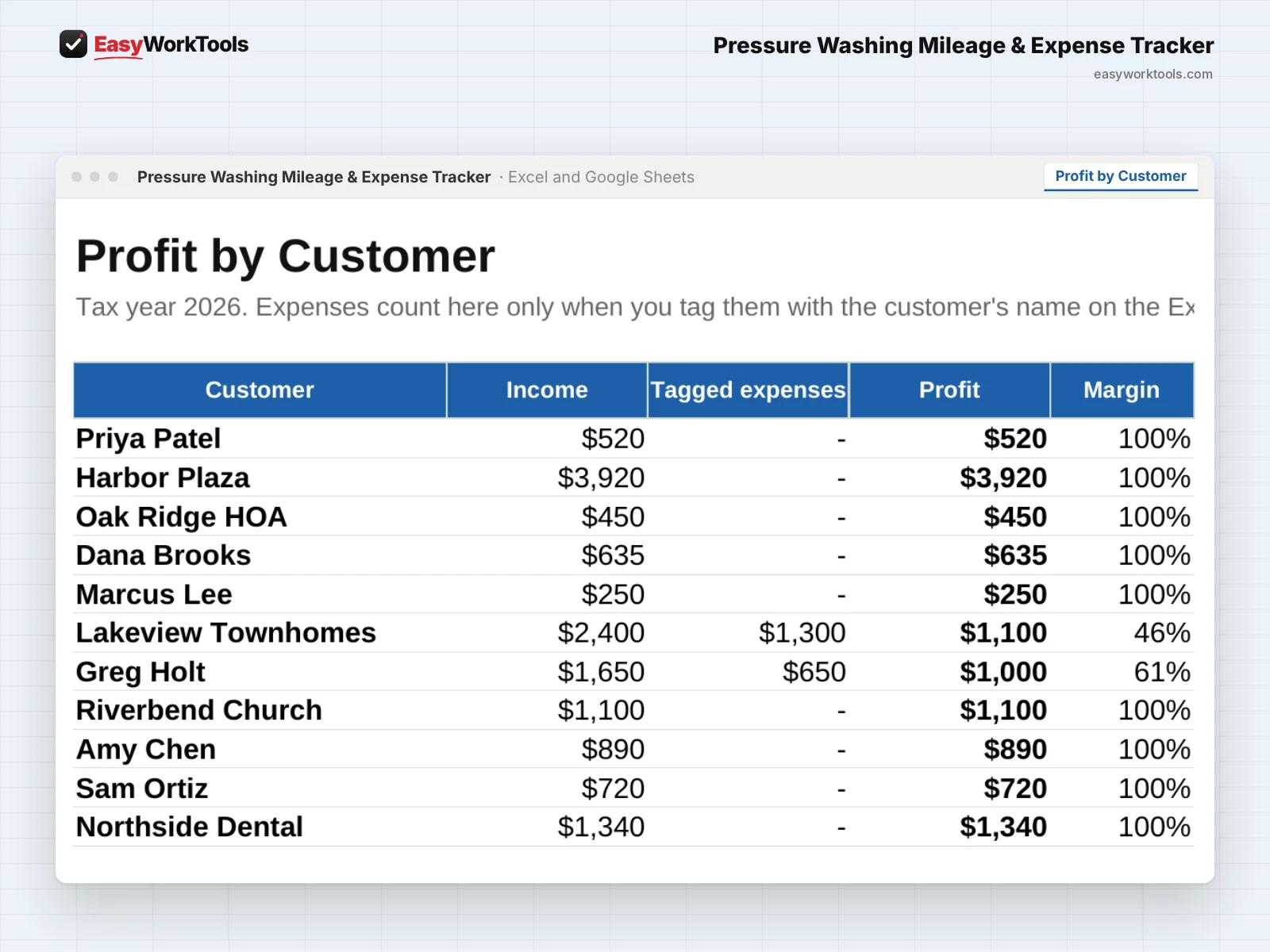
Pressure Washing Mileage & Expense Tracker Profit by Customer tab in Excel and Google Sheets. Profit by Customer shows what each customer really earned you.
Profit by Customer shows what each customer really earned you.
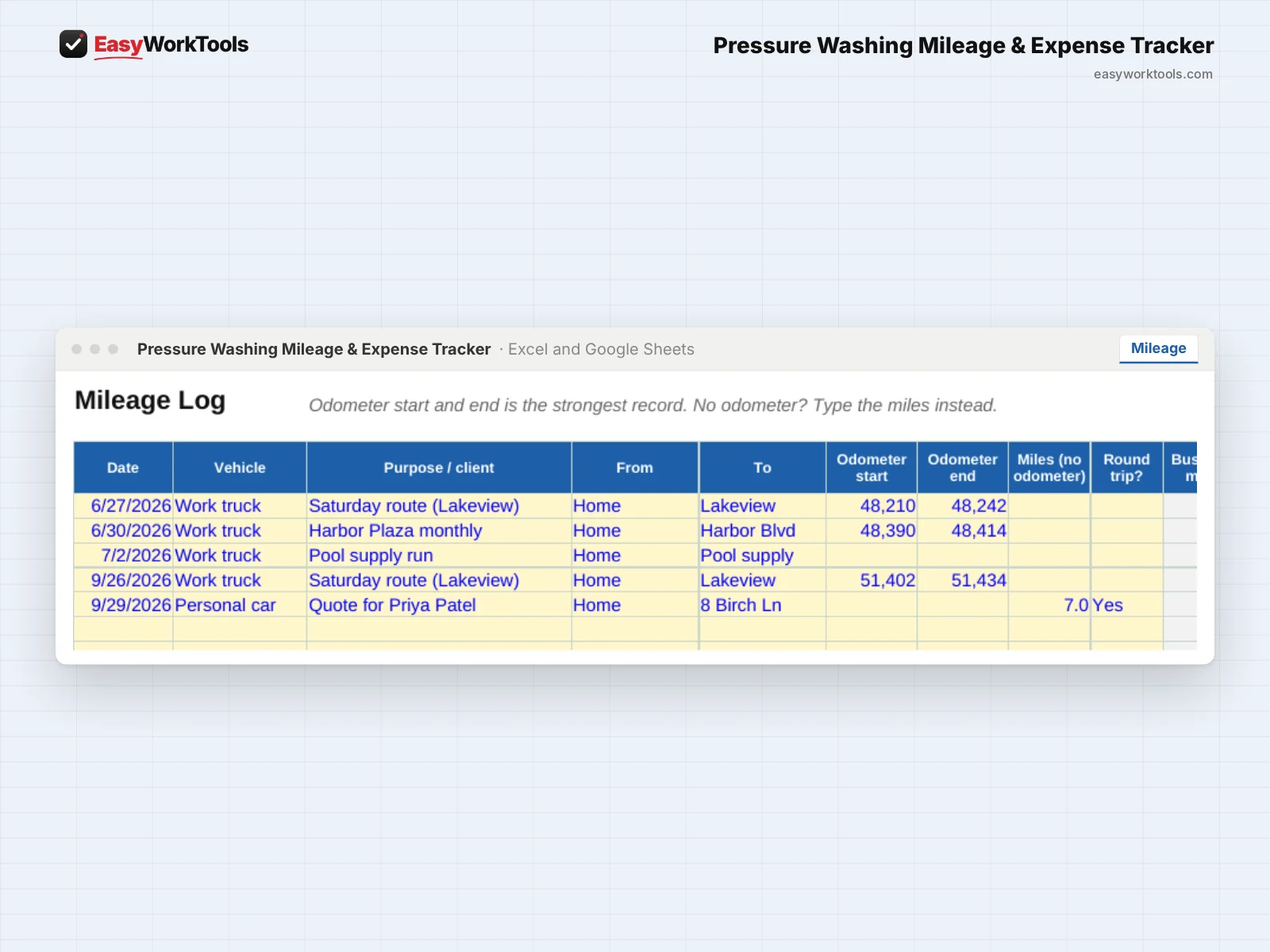
Pressure Washing Mileage & Expense Tracker Mileage tab in Excel and Google Sheets. The mileage log applies the right IRS rate for each trip's date.
The mileage log applies the right IRS rate for each trip's date.

Pressure Washing Mileage & Expense Tracker

This pressure washing mileage and expense tracker turns chemicals, fuel, nozzles, and miles into tax-time totals by Schedule C line, plus profit by customer.

$9
Buy Now · $9

One payment. No subscription.

Secure checkout · Instant download

  • Instant download · Version 1.5, updated Oct 3, 2026
  • Microsoft Excel and Google Sheets
  • Example and blank copies included
  • Formulas locked against accidents
  • Free Lifetime Updates
  • See how it works before you buy

Inside

Start HereDashboardTax SummaryProfit by CustomerMileageExpensesIncomeSettings

Our promise: if something doesn't work as described, tell us within 30 days. We'll fix it, or refund you. Refund policy

What this solves

Chemical runs, supply stops and job sites add up to thousands of deductible miles. Most of them never get written down.

Without the tool"I'll piece it together in April."

Your numbers, with the Mileage & Expense Tracker

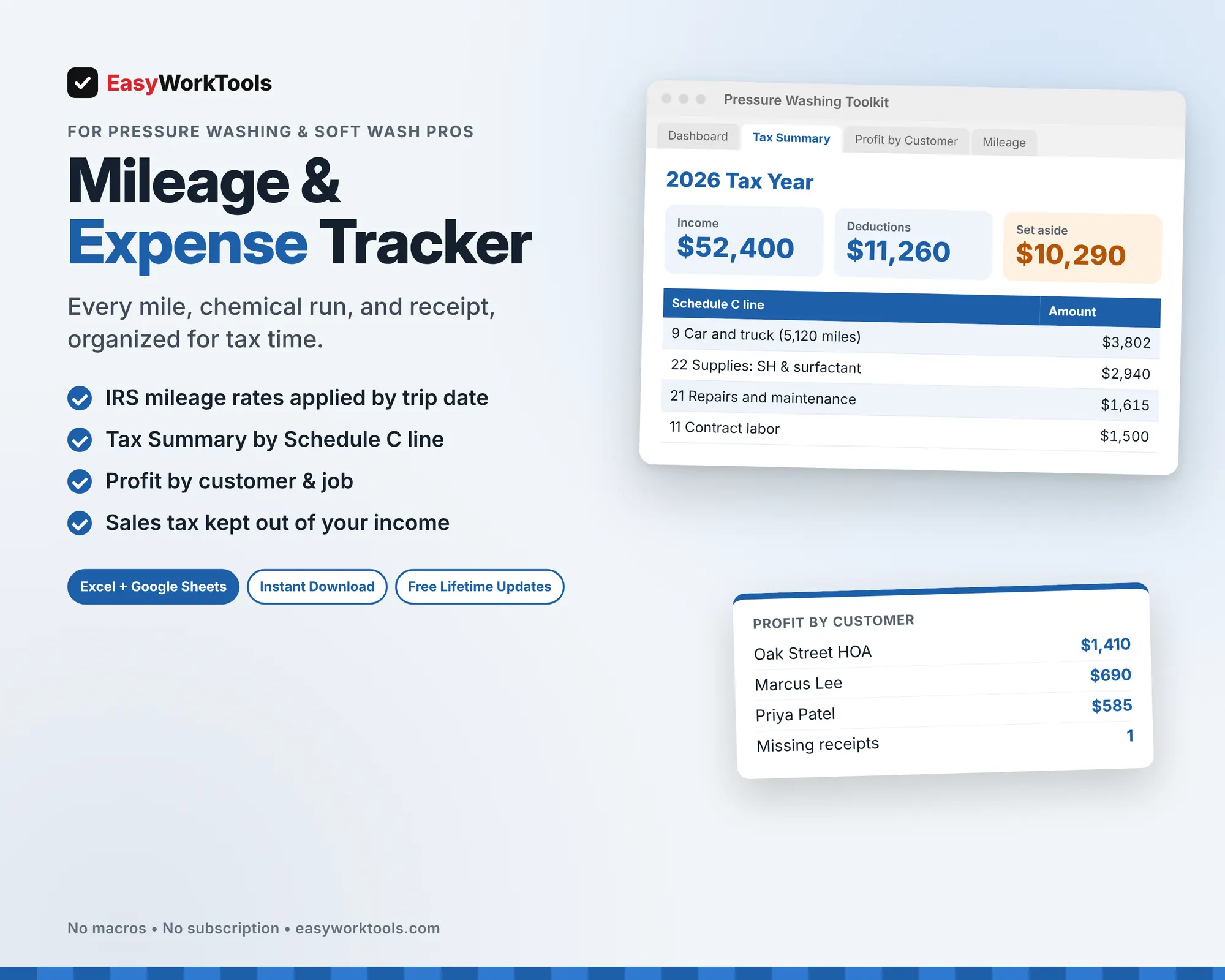
Income$52,400
Deductions found$11,260
Missing receipts0

Totals by Schedule C line, ready for your tax preparer.

Example numbers. Yours come from your own rates and costs.

Built for pressure washing: SH and surfactant, water, equipment repairs, and the sales tax some states make you collect, which this tracker keeps out of your income so you don't pay tax on it twice.

What the Pressure Washing Mileage & Expense Tracker does

  • Mileage log with the right IRS rate for each trip's date, including the July 2026 change to 76 cents
  • Pressure washing expense categories matched to Schedule C lines
  • Tax Summary tab ready to print for your tax pro
  • Profit by Customer: tag expenses to a job and see what each customer really earned you
  • Sales tax you collect is tracked separately and kept out of income
  • Contractor tracker that flags who needs a 1099-NEC
  • Quarterly tax set-aside estimate and monthly profit

What's inside

8 tabs: Start Here, Dashboard, Tax Summary, Profit by Customer, Mileage, Expenses, Income, Settings.

Who it's for

Pressure washing owners who want clean records and real numbers without bookkeeping software.

What you get

Two spreadsheet files (.xlsx): one filled with examples so you can see exactly how it works, and a blank copy ready for your business. For Microsoft Excel and Google Sheets. No macros, no subscription.

The formulas are locked, so a stray keystroke can't break them. You only type in the yellow cells.

This is a record-keeping tool, not tax advice. The set-aside is a planning estimate. Share your totals with a tax professional before you file.

Questions

Does it handle sales tax?

Yes. Enter it in its own column and it stays out of your income totals.

Is there a blank version?

Yes. Every download has two files: one filled with examples so you can see how everything works, and a blank copy ready for your own business. Your rates and settings come filled in as a starting point, so change them to match yours.

Can I change the formulas?

The gray formula cells are locked so they can't be erased by accident. If you really want to change one, open Review in Excel and choose Unprotect Sheet. There's no password.

Does it work in Google Sheets?

Yes. Upload the file to Google Drive and open it with Google Sheets. Everything works the same.

How do Free Lifetime Updates work?

Whenever we release a new version, you can download it free from your account, forever. We'll email you when there's something new.
Always getting better

Every EasyWorkTools spreadsheet is complete, tested and ready to run your business the day you buy it. Then it keeps getting better. We're perfectionists, so we're always sharpening our tools, and some of our best upgrades start with a customer saying "it would be great if..."

Tell us what would make a tool even better for your business, or what tool you wish existed. If it helps you, it probably helps others too.

  1. You tell us what's slowing you down.
  2. We build and test it the same way as every release.
  3. You get it free in the next update, with an email when it's ready.

  • Excel + Google SheetsWorks in both, no macros
  • Instant downloadStart using it in minutes
  • Free Lifetime UpdatesEvery new version, free
  • Locked formulasExample and blank copies