Before you start
- Your download is a zip with two files. Double-click it to open it. Start with the one marked with examples to see how everything works, then use the blank one for your business.
- Open the file in Microsoft Excel. Using Google Sheets? Upload it to Google Drive, then open it with Google Sheets.
- Start on the Start Here tab. It has the same steps, right inside the file.
- The sample data is there so you can see how everything works. Type over it with your own when you're ready.
Here's how to go from a new file to a priced, printable quote. The first part takes about 10 minutes and you only do it once. After that, a typical house takes about 3 minutes to quote.
1Set up your rates (one time, about 10 minutes)
- Open the My Rates tab. Start at the top with your business name, phone, email, and payment terms. These show on every customer quote.
- Fill in Your Costs: what you pay your crew per hour, overhead per working hour, gas price, your truck's miles per gallon, and your minimum job charge.
- Set your target profit margin. If you're not sure, 35% is a healthy starting point for most washing businesses.
- Tell it about your rig: your machine's GPM and your flatwork tool, from wand only up to a 24 inch surface cleaner. Bigger tools clean flatwork faster, so your time estimates stay honest.
- Go down the Services & Add-Ons list and type your price per square foot (or per item) for each service. The example prices are placeholders, not advice. Not sure what to charge? Read the Pricing Help tab first.
- Optional: rename your three packages at the bottom of My Rates. They start as Essentials, Full Home Wash, and Premium Protection.
2Measure the job (about 2 minutes)
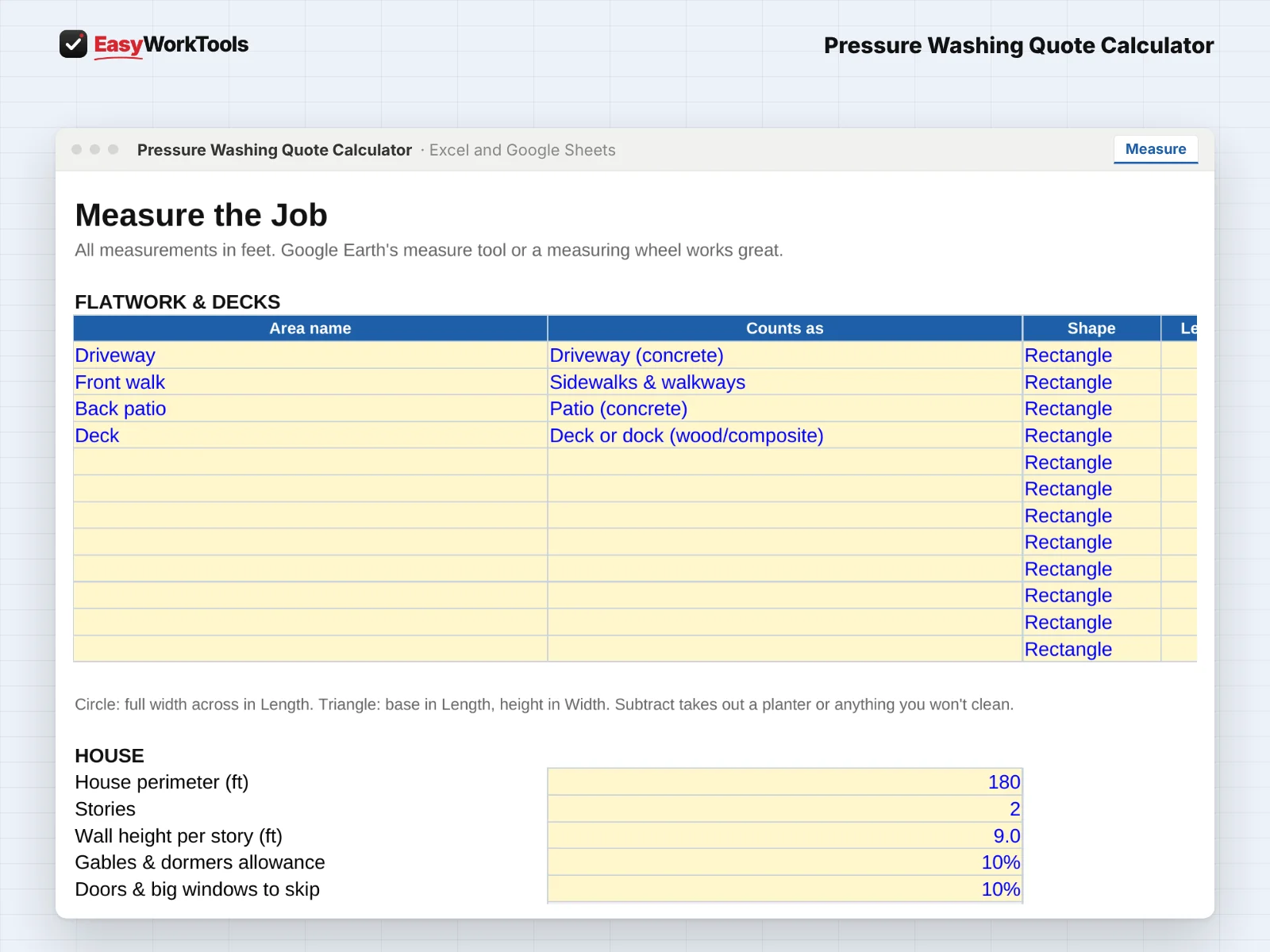
- Open the Measure tab. Under Flatwork & Decks, add a line for each area: driveway, walkways, patio, deck. Pick what each area counts as, pick the shape, and type the length and width in feet.
- Odd shapes? Break them into rectangles and triangles. For a circle, type the full width across in Length. If you already know the square feet, pick Known sq ft.
- Under House, enter the house perimeter and number of stories (1, 2, or 3). The siding area figures itself out, including gables and an allowance for doors and windows.
- Under Roof, enter the roof footprint and pick the pitch: flat or low, medium (walkable), or steep (harness).
- Add fence and gutter lengths if you're quoting them. Tip: Google Earth's measuring tool works great for all of this.
3Price the job (about 1 minute)
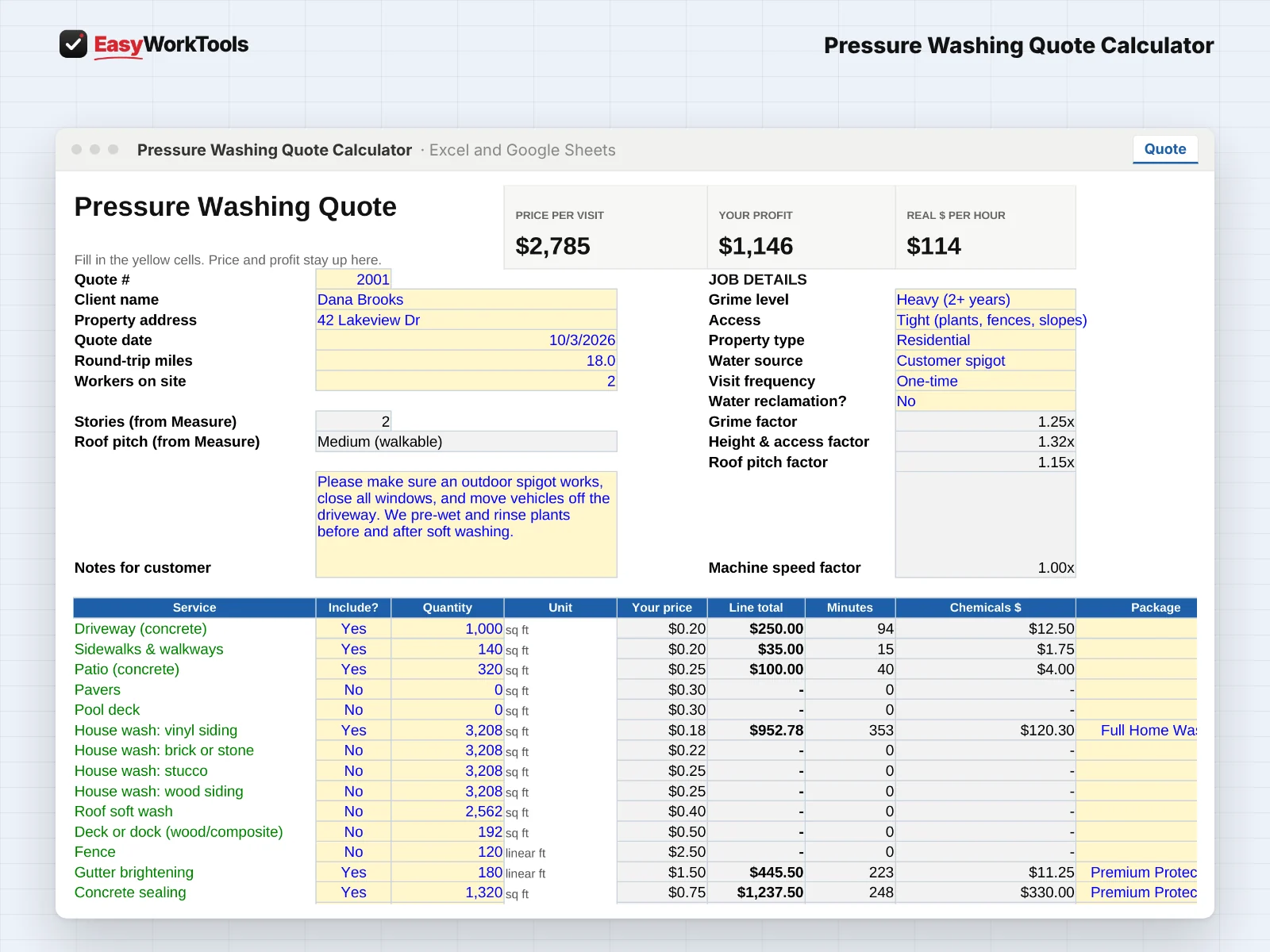
- Open the Quote tab. Fill in the client name, address, round-trip miles, and how many workers are going.
- Pick the Job Details from the dropdowns: grime level (light yearly upkeep up to neglected with moss and mildew), access, property type, water source, visit frequency, and whether you're reclaiming water.
- In the service list, set each service you're doing to Yes. Quantities fill in from the Measure tab on their own.
- Look at the three boxes at the top: Price per visit, Your profit, and Real $ per hour. They stay in view while you scroll, so you always know where you stand.
- Read the line under the profit check. A ✔ means the quote meets your target margin. A ⚠ or ✖ tells you exactly what to charge instead. See the warnings section below.
4Offer Good, Better, Best packages
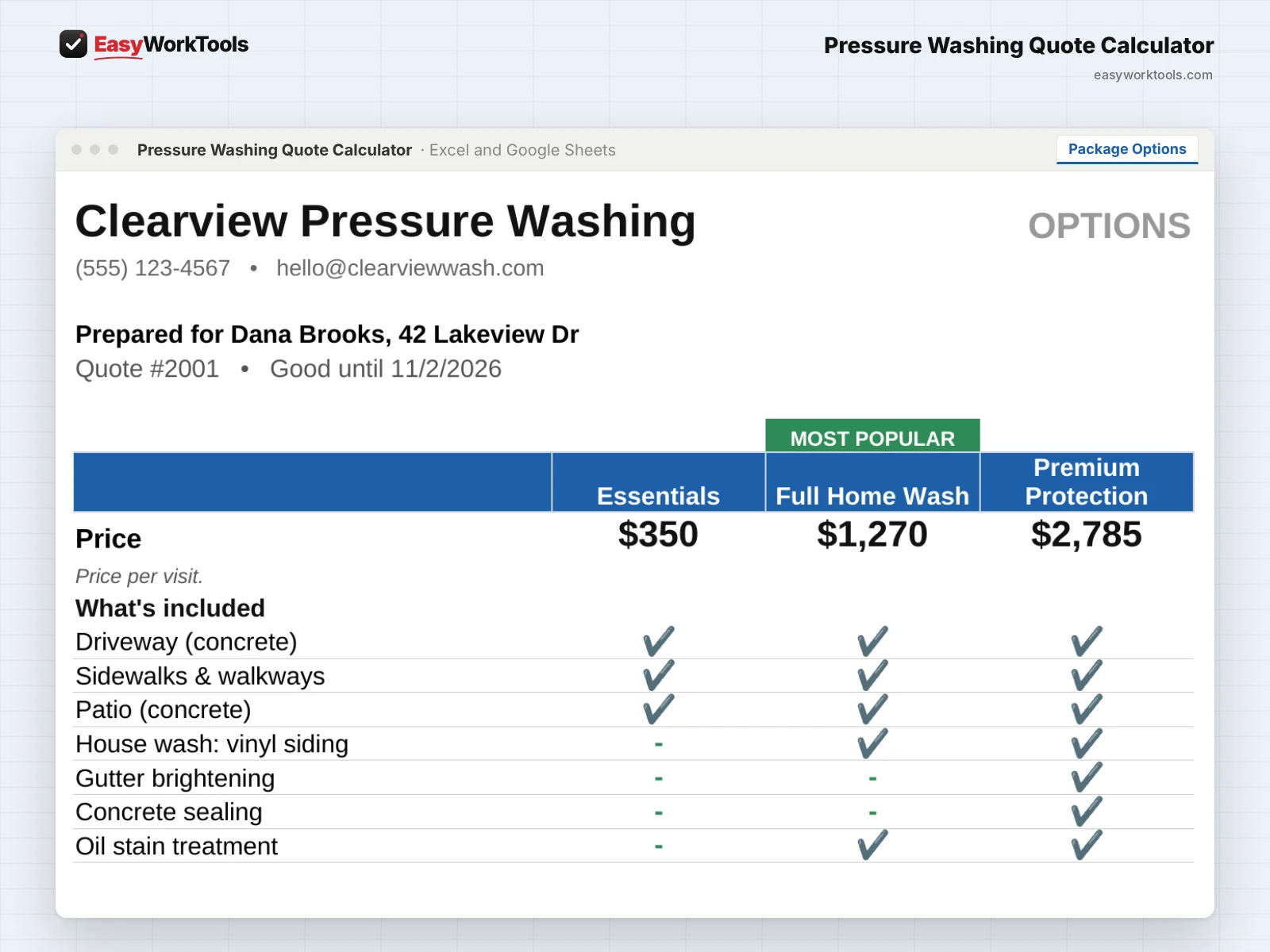
- On the Quote tab, use the Package column to tag services. Leave your basic services blank and they go in every package. Tag upgrades with the second or third package.
- Each package includes everything in the packages before it. For example, Premium Protection includes everything in Full Home Wash plus its own extras.
- Scroll down to Good, Better, Best Packages to see the price, profit, and margin for all three side by side.
- Open the Package Options tab and print it or save it as a PDF. Your customer sees three clear choices with a Most Popular label on the middle one, and most people pick the middle one.
5Send the quote
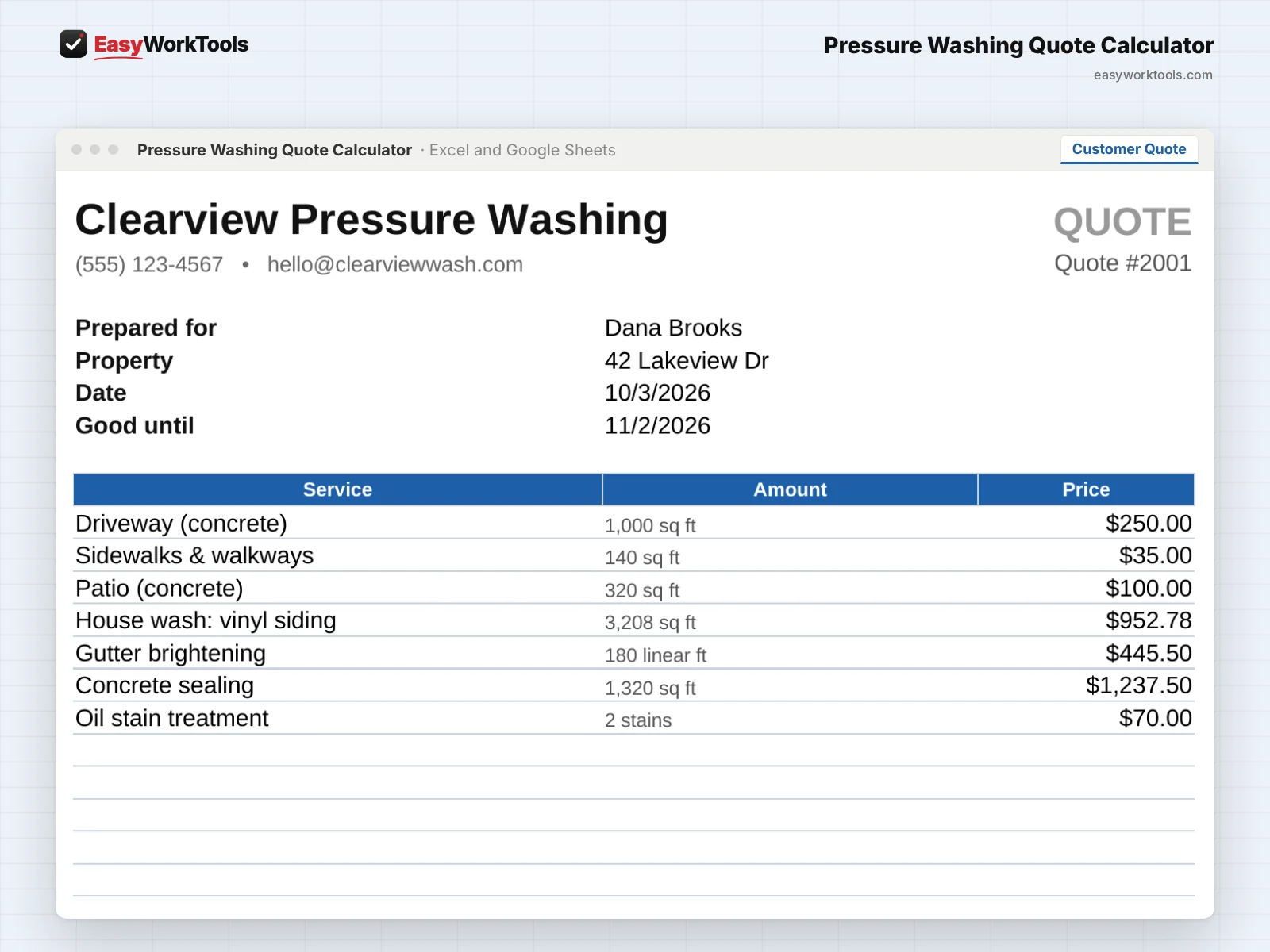
- Open the Customer Quote tab. It fills itself in with your business info, the services, and the total.
- Print it, or save it as a PDF to email or text. In Excel: File, then Print, then pick PDF. In Google Sheets: File, then Download, then PDF.
- Your costs, margins, and hourly numbers never show on the customer quote. Only the prices do.
What the messages mean
The tool watches your numbers and tells you in plain words when something needs a look. Here's every message you might see.
What to do: Nothing to fix. Send it.
What to do: Raise the price to the amount shown, or check that your service prices and costs on My Rates are right.
What to do: Charge at least the amount shown. Double check the measurements first, since a typo in square feet is the most common cause.
What to do: Raise that package to the price shown, or move a small service into it.
What to do: Leave the Package column blank on your basic services, like the driveway and walkways.
What to do: For taller buildings, walk the job and price it by hand.
Using Google Sheets or your phone
- To use Google Sheets, upload the file to Google Drive, then right-click it and choose Open with, then Google Sheets.
- Dropdowns, colors, and every calculation work the same in Google Sheets.
- On a phone, the Google Sheets and Excel apps work for quick changes. For setup and printing, a computer is easier.
- Want to start fresh? Type over the yellow example cells. Don't delete rows, since other tabs may be reading them.
Common questions
Can I save a quote and start a new one?
Yes. Save a copy of the file for each customer (File, then Save As), then type over the job details for the next one. Many people keep one file per customer in a folder.
Why is my real $ per hour lower than my price per hour?
Because it counts everything: drive time, setup, and breakdown, not just the time spent washing. It's the honest number.
Do I have to measure everything?
No. If you already know the square feet, choose Known sq ft on the Measure tab and type the number in.
Quick reference from the Start Here tab
Welcome
Quoting a pressure washing job by gut feel is how you end up washing a two-story house with a mossy roof for the price of a driveway. This calculator measures the job, prices every surface the right way, and shows your real profit after chemicals, fuel, water, and your time.
Setup (About 10 Minutes, One Time)
Open 'My Rates'. Add your business info, your costs, your machine, and what you charge for each service.
New to pricing? Read 'Pricing Help' first. The example prices are placeholders, not advice.
Quoting A Job (About 3 Minutes)
Open 'Measure'. Add flatwork areas (driveway, patio, walkways, deck), the house perimeter and stories, the roof footprint and pitch, and any fence.
Open 'Quote'. Pick the grime level, access, and water source. Set each service to Yes or No. Quantities fill in from Measure.
Add extras like oil stain treatment, rust spots, sealing, or gutter brightening.
Check the profit box. If you see a warning, the tool tells you what to charge instead.
Open 'Customer Quote', then print it or save it as a PDF. Your costs never show on it.
Want to offer choices? Tag services with a package on the Quote, then print 'Package Options' so the customer can pick Good, Better, or Best.
Handy Tips
House siding area comes from the perimeter and number of stories, with an allowance for gables. Measure the perimeter with Google Earth's measure tool or a wheel.
Roof area uses the footprint and pitch. A steep roof has much more surface than its footprint, and it's priced that way.
Your machine's GPM sets how fast flatwork goes. A 4 GPM rig with a 20 inch surface cleaner covers ground much faster than a 2.5 GPM homeowner unit.
The water box shows about how many gallons the job uses, so you know whether the customer's spigot can keep up.
Using Google Sheets? Upload this file to Google Drive and open it with Google Sheets. Everything works the same.
Safety Note
Roofs and most siding should be soft washed with low pressure and the right chemicals, not blasted. Always follow chemical labels, protect plants, and work safely on ladders and roofs.
Your License
This file is licensed to one business, including everyone who works there. Please don't share, resell or post it online.
© 2026 EasyWorkTools. All rights reserved. easyworktools.com
Every tab
This file has 7 tabs, in this order:
- Start Here
- Measure
- Quote
- Customer Quote
- Package Options
- My Rates
- Pricing Help