Before you start
- Your download is a zip with two files. Double-click it to open it. Start with the one marked with examples to see how everything works, then use the blank one for your business.
- Open the file in Microsoft Excel. Using Google Sheets? Upload it to Google Drive, then open it with Google Sheets.
- Start on the Start Here tab. It has the same steps, right inside the file.
- The sample data is there so you can see how everything works. Type over it with your own when you're ready.
Here's how to enter your chemicals once, then get exact mixes for any tank, injector, or job. Always follow your chemical labels and safety data sheets.
1Enter your chemicals (one time, about 5 minutes)
- Open Prices & Strengths. Enter what you pay for SH and surfactant, and how much surfactant you use per gallon of mix.
- Enter your SH strength today. SH loses strength in heat and sunlight, so a jug that started at 12.5% may be closer to 10% after a few weeks in a hot truck. Use today's strength, not the label's.
- Check the Surface Guide. Those strengths are common starting points only. Your product labels and your own results come first.
2Mix a batch
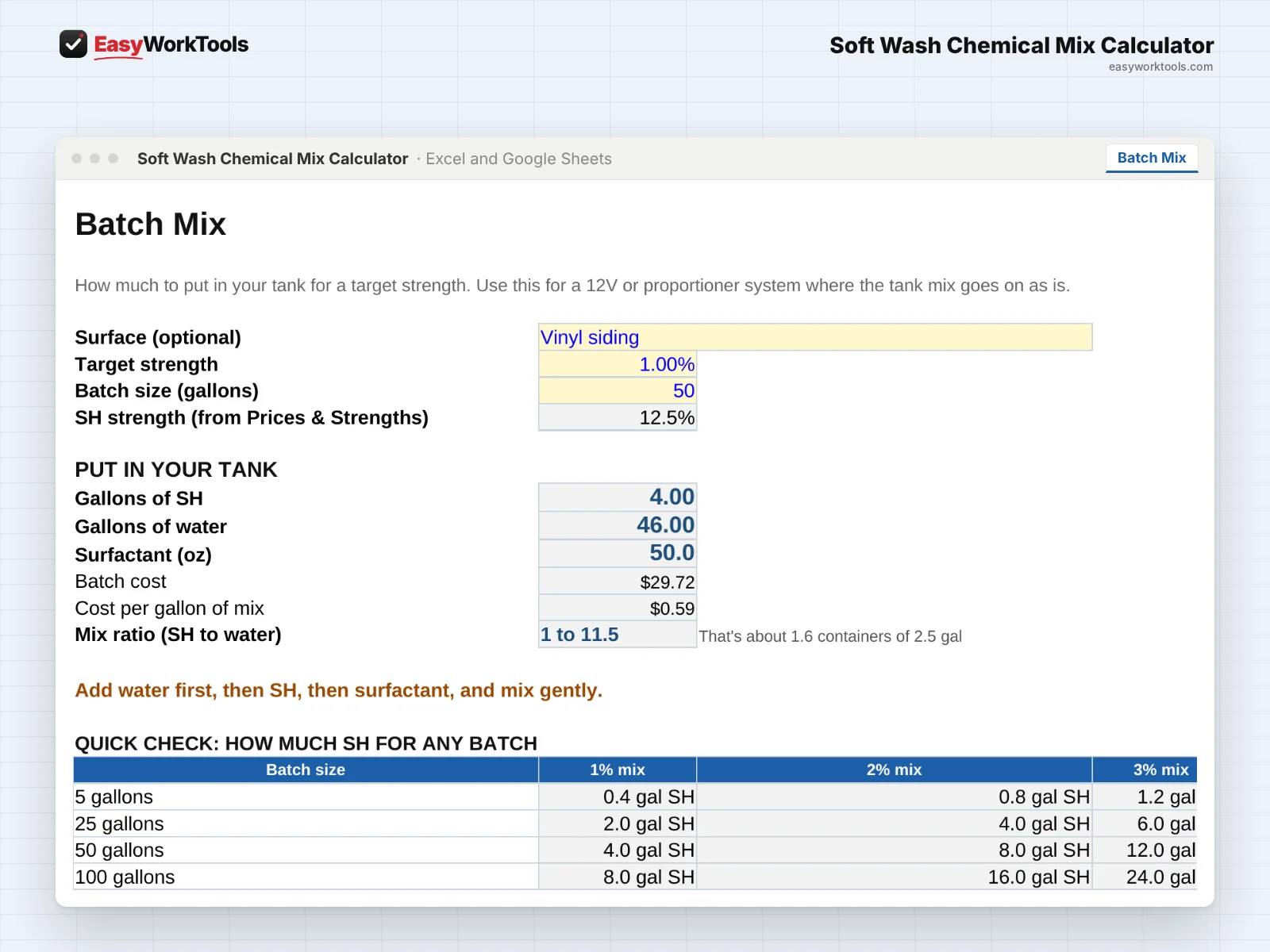
- Open Batch Mix. Pick the surface (optional), then type your target strength and batch size in gallons.
- Read Put in your tank: gallons of SH, gallons of water, and ounces of surfactant, plus the batch cost and the mix ratio the way pros say it, like 1 to 11.5.
- Mix in this order: water first, then SH, then surfactant, and mix gently.
- The Quick Check table shows how much SH you need for common batch sizes at 1%, 2%, and 3%.
3Running a downstream injector
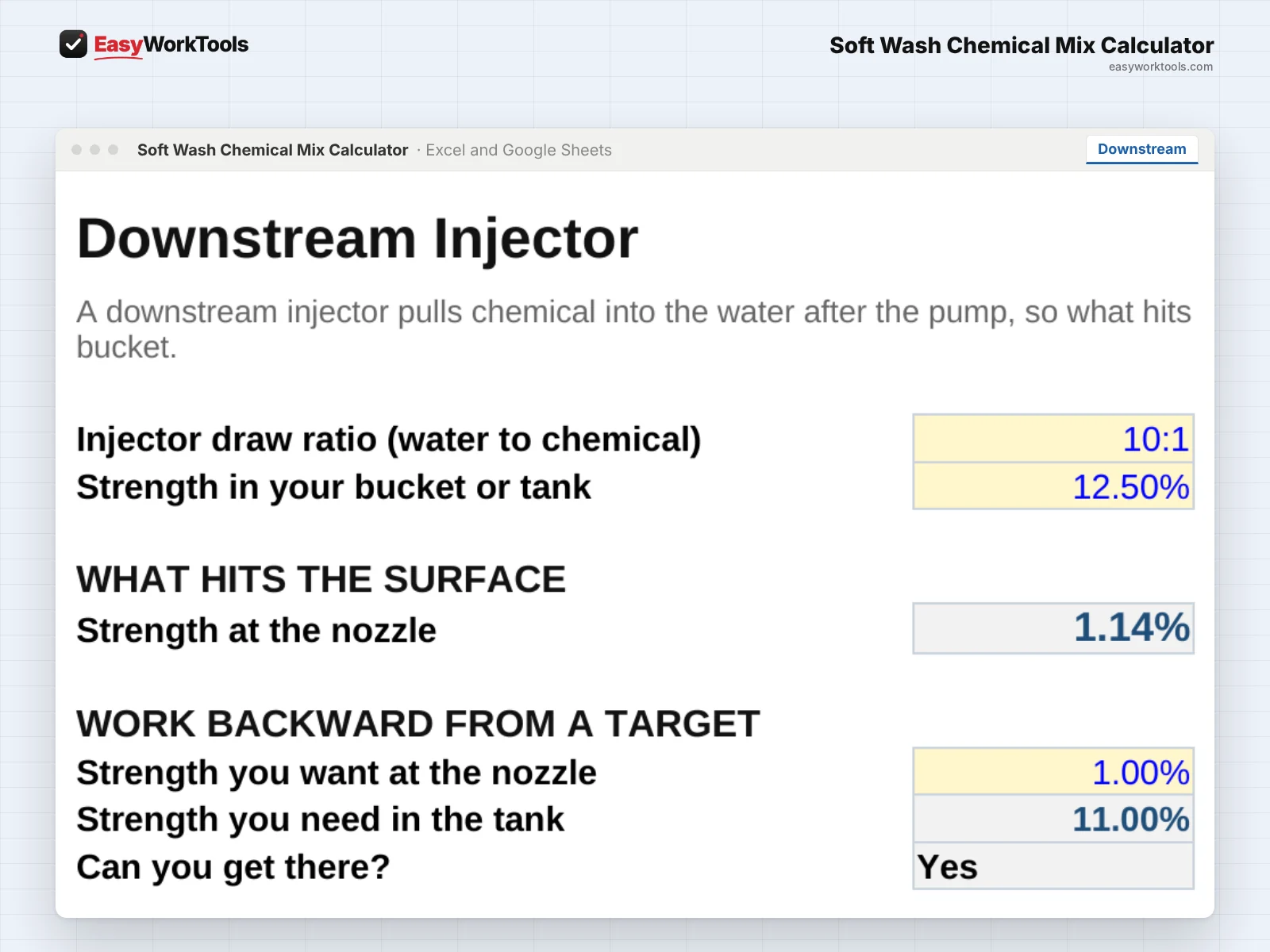
- Open Downstream. Enter your injector's draw ratio (for example 10:1) and the strength in your bucket or tank.
- What hits the surface shows the real strength at the nozzle. It's much weaker than your bucket.
- Need a certain strength at the wall? Use Work backward from a target. It tells you what to mix in your tank, or if you can't get there with that injector.
4Plan a whole job
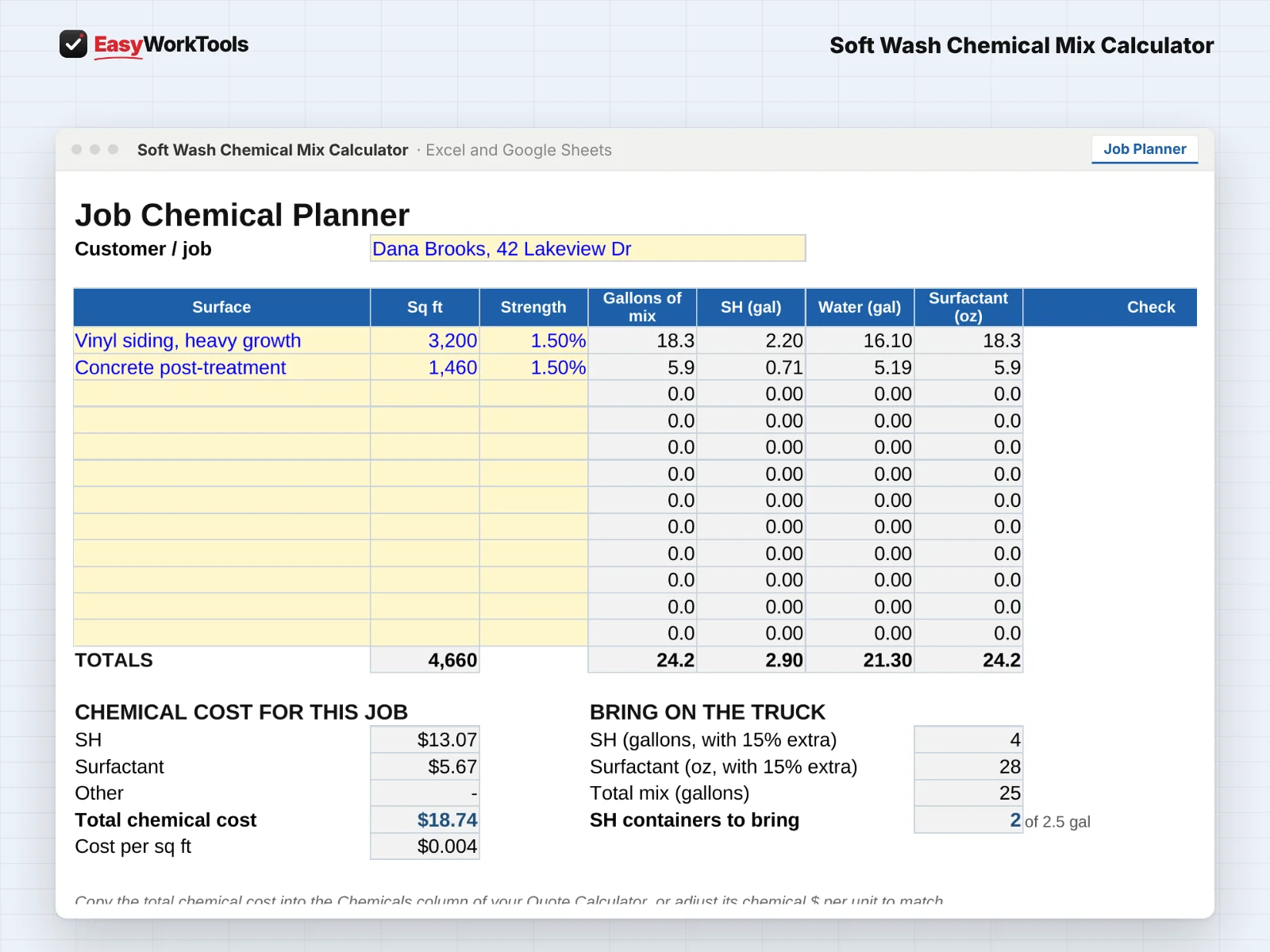
- Open Job Planner. Add each surface on the job and its square feet.
- It totals the gallons of mix, SH, water, and surfactant, plus your chemical cost for the job and how many SH containers to bring.
- Copy the chemical cost into the Pressure Washing Quote Calculator so your quote covers it.
5Print the crew mix card
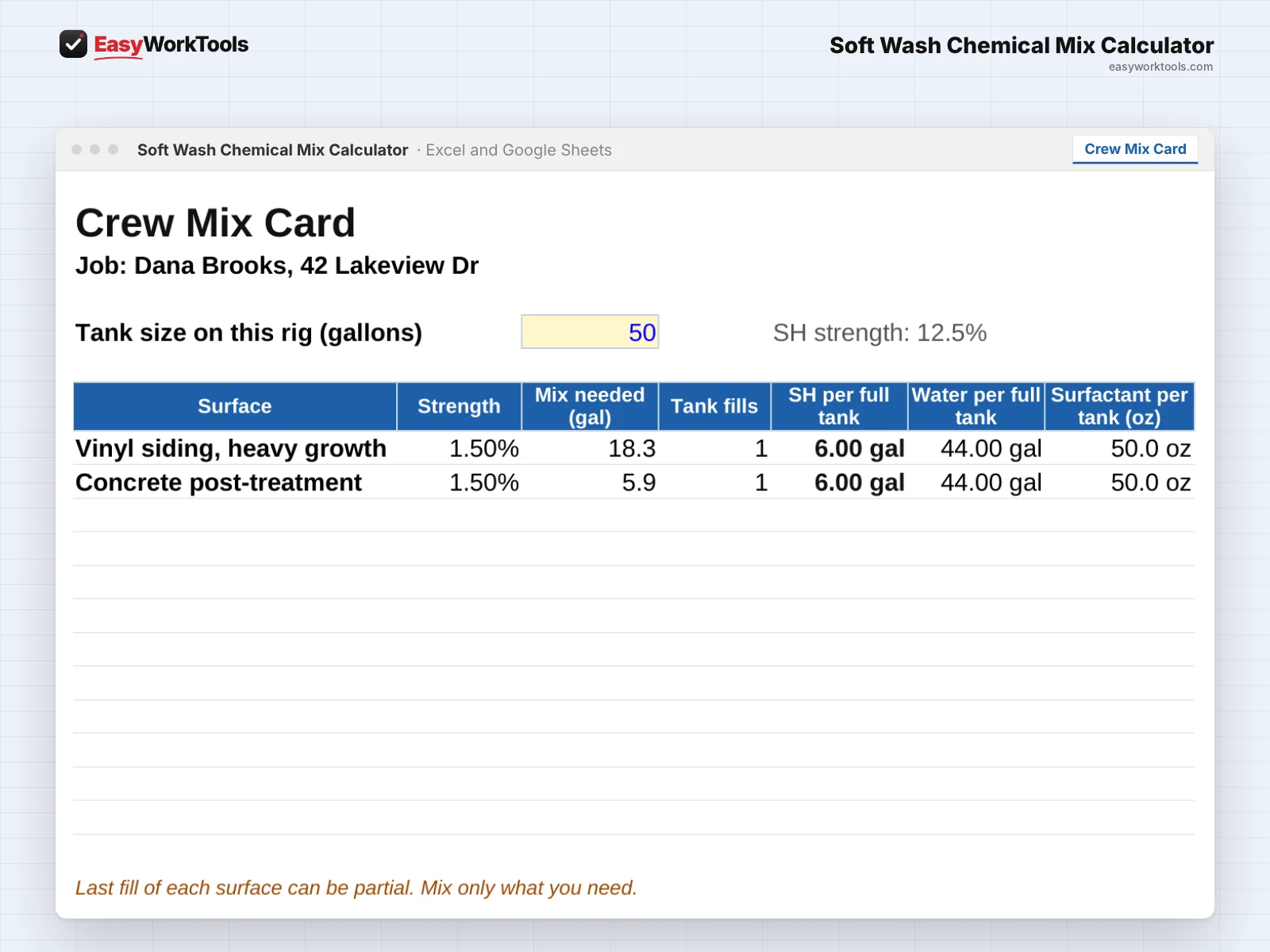
- Open Crew Mix Card and enter the tank size on this rig.
- It shows how many tank fills each surface needs and exactly what goes in each full tank. Print it so everyone mixes the same way.
- The last fill of each surface can be partial. Mix only what you need.
6Keep track of what's on hand
- Open Inventory. Update the gallons of SH and ounces of surfactant on hand when you buy or after a job.
- Set your average SH per job. It shows how many jobs your stock covers and tells you when to reorder.
- Read the Safety tab once and keep it in the truck.
What the messages mean
The tool watches your numbers and tells you in plain words when something needs a look. Here's every message you might see.
What to do: Lower the target strength or buy stronger SH.
What to do: Double check the surface and your product label before using it.
What to do: Type today's SH strength on Prices & Strengths.
What to do: Use a 12V or proportioner system, or an injector with a lower draw ratio.
What to do: Reorder SH before your next job.
What to do: Reorder surfactant.
What to do: Type the tank size in gallons at the top of the card.
Using Google Sheets or your phone
- To use Google Sheets, upload the file to Google Drive, then right-click it and choose Open with, then Google Sheets.
- Dropdowns, colors, and every calculation work the same in Google Sheets.
- On a phone, the Google Sheets and Excel apps work for quick changes. For setup and printing, a computer is easier.
- Want to start fresh? Type over the yellow example cells. Don't delete rows, since other tabs may be reading them.
Common questions
Does it work with pool store bleach?
Yes. Enter the strength on the label, or better, today's tested strength.
Is this safety advice?
No. The tool does the math. Always follow the label and safety data sheet for every chemical you use.
Quick reference from the Start Here tab
Welcome
Mix too weak and the mildew comes right back. Mix too strong and you burn plants, waste chemical, and risk the surface. This calculator gives you the exact gallons of SH, water, and surfactant for the strength you want, shows what your downstream injector really delivers, and tells you what the chemicals cost on every job.
Setup (About 5 Minutes)
Open 'Prices & Strengths'. Enter what you pay for SH and surfactant, and the strength of the SH you actually have.
Check the surface guide. The strengths there are common starting points only. Your product labels and your own results come first.
What Each Tab Does
Batch Mix: how much SH, water, and surfactant to put in your tank for a target strength.
Downstream: what strength actually hits the wall with your injector, and what tank mix you need for a target.
Job Planner: pick the surfaces on a job and get the total gallons of mix, SH, surfactant, and chemical cost.
Crew Mix Card: a printable card for each job with exactly what goes in each tank fill.
Inventory: what you have on hand, how many jobs it covers, and when to reorder.
Safety: the rules that keep you, the customer, and their plants safe. Read it once.
Good To Know
SH loses strength over time, especially in heat and sunlight. A jug that started at 12.5% may be closer to 10% after a few weeks in a hot truck. Enter today's strength, not the label's.
Use the chemical cost per job in the Pressure Washing Quote Calculator so your quotes cover it.
Using Google Sheets? Upload this file to Google Drive and open it with Google Sheets. Everything works the same.
Your License
This file is licensed to one business, including everyone who works there. Please don't share, resell or post it online.
© 2026 EasyWorkTools. All rights reserved. easyworktools.com
Every tab
This file has 8 tabs, in this order:
- Start Here
- Prices & Strengths
- Batch Mix
- Downstream
- Job Planner
- Crew Mix Card
- Inventory
- Safety