

A dull blade drags, a tired clipper overheats, and a mobile generator that quits cancels the whole day. This log tracks every item on the schedule that fits it: days, grooms, engine hours or miles.
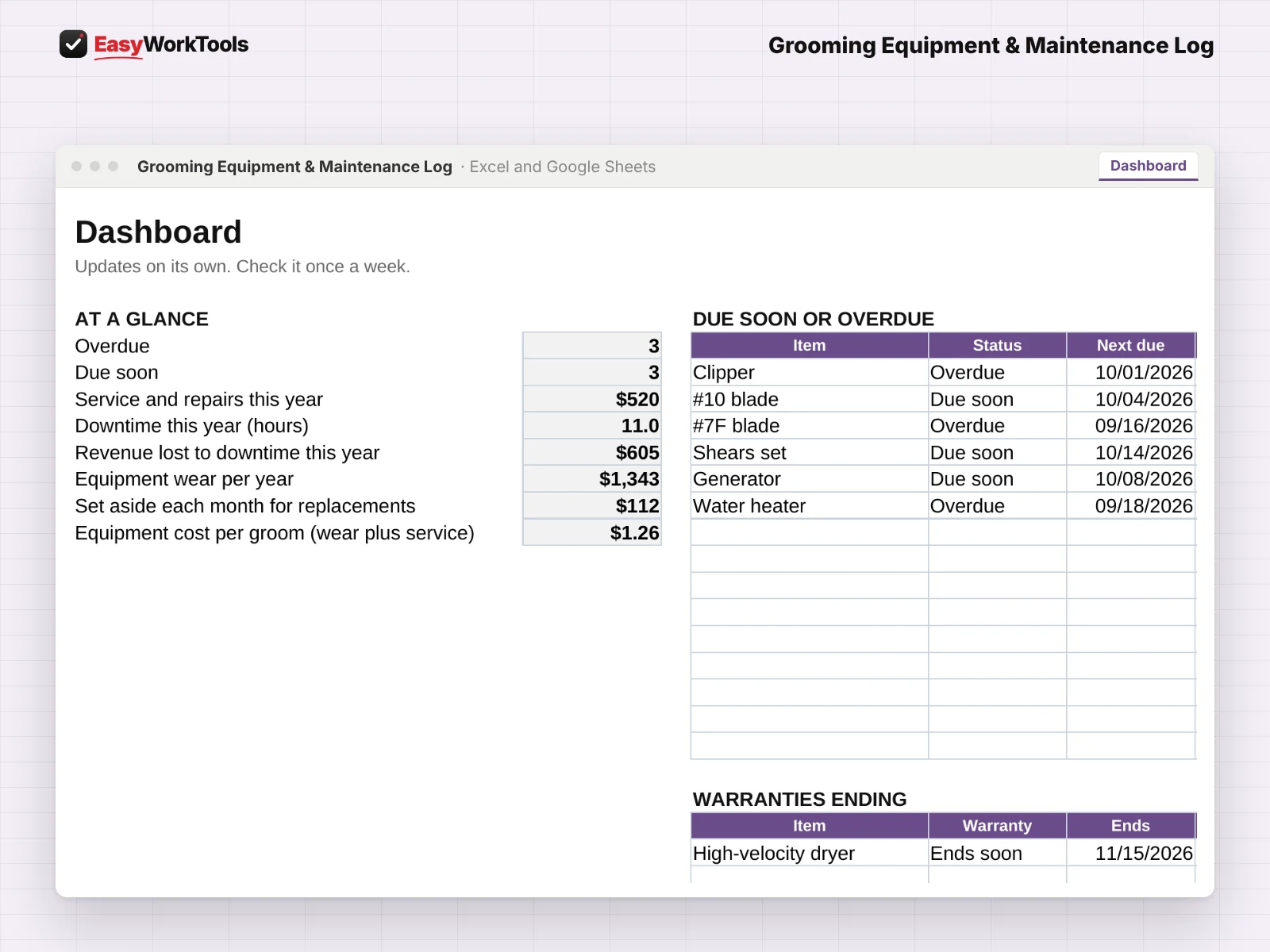
Every step is laid out before you buy, so you can see how service alerts work with screenshots from the real file. It also works hand in hand with our groom pricing calculator.
What the Grooming Equipment & Maintenance Log does
- Clippers, blades, shears, dryers, tubs, tables, and mobile van systems
- Service schedules by days, weeks, months, grooms, engine hours or miles
- Due-soon and overdue alerts on a Dashboard
- Service and repair log with downtime hours and the revenue it cost you
- Warranty end dates with reminders
- Yearly wear per item, a monthly replacement fund, and equipment cost per groom
- Salon, Mobile or Both on every item
What's inside
5 tabs: Start Here, Dashboard, Equipment, Service Log, Settings.
Who it's for
Salon groomers with a drawer full of blades, and mobile groomers whose van, generator and water heater are the business.
What you get
Two spreadsheet files (.xlsx): one filled with examples so you can see exactly how it works, and a blank copy ready for your business. For Microsoft Excel and Google Sheets. No macros, no subscription.
The formulas are locked, so a stray keystroke can't break them. You only type in the yellow cells.
What you need to use it
- Microsoft Excel 2010 or newer, on Windows or Mac, including Microsoft 365
- Or Google Sheets in any web browser, free with a Google account
- A laptop or desktop works best for setup. Phones and tablets are fine for checking numbers and quick entries.
- No macros, add-ins or internet connection needed once it's downloaded. Apple Numbers isn't supported.
Questions
Can I track blades by grooms instead of dates?
Yes. Pick Grooms as the unit and enter your groom count on Settings.
Does it work for mobile vans?
Yes. Track the generator by engine hours and the van by miles.
Is there a blank version?
Yes. Every download has two files: one filled with examples so you can see how everything works, and a blank copy ready for your own business. Your rates and settings come filled in as a starting point, so change them to match yours.
Can I change the formulas?
The gray formula cells are locked so they can't be erased by accident. If you really want to change one, open Review in Excel and choose Unprotect Sheet. There's no password.
Does it work in Google Sheets?
Yes. Upload the file to Google Drive and open it with Google Sheets. Everything works the same.
How do Free Lifetime Updates work?
Whenever we release a new version, you can download it free from your account, forever. We'll email you when there's something new.