Before you start
- Your download is a zip with two files. Double-click it to open it. Start with the one marked with examples to see how everything works, then use the blank one for your business.
- Open the file in Microsoft Excel. Using Google Sheets? Upload it to Google Drive, then open it with Google Sheets.
- Start on the Start Here tab. It has the same steps, right inside the file.
- The sample data is there so you can see how everything works. Type over it with your own when you're ready.
Here's how to go from a new file to a priced, printable quote. Setup takes about 15 minutes, once. After that a home takes about 3 minutes.
1Set up your rates (one time, about 15 minutes)
- Open My Rates. Add your business name, phone, email and payment terms. They print on every customer quote.
- Fill in your costs: pay per cleaner per hour, payroll extras, overhead per cleaning hour, target margin and your lowest price per visit.
- Check the room times. They're minutes for one cleaner to do a standard clean of a typical room. Time a few of your own cleans and change them.
- Look over cleaning types, condition, pets, clutter and how often. Each one changes the time, and the price follows.
- Open Supplies and enter what your products cost and how many visits they last.
2Quote a home

- Open Quote. Enter the customer, then pick the cleaning type, how often, condition, pets and clutter.
- Count the rooms. Add any extras, and read the Agree on the details note next to each one.
- Read the top: price per visit, profit and what each cleaner hour earns. Regular homes also show the first clean price.
3Compare every booking option

- Open Price Options. One-time, deep, move-out, weekly, every 2 weeks, monthly and the first clean are priced side by side.
- Use it on the phone with the customer. Weekly costs less per visit but brings in the most each month.
4Print the quote and walkthrough
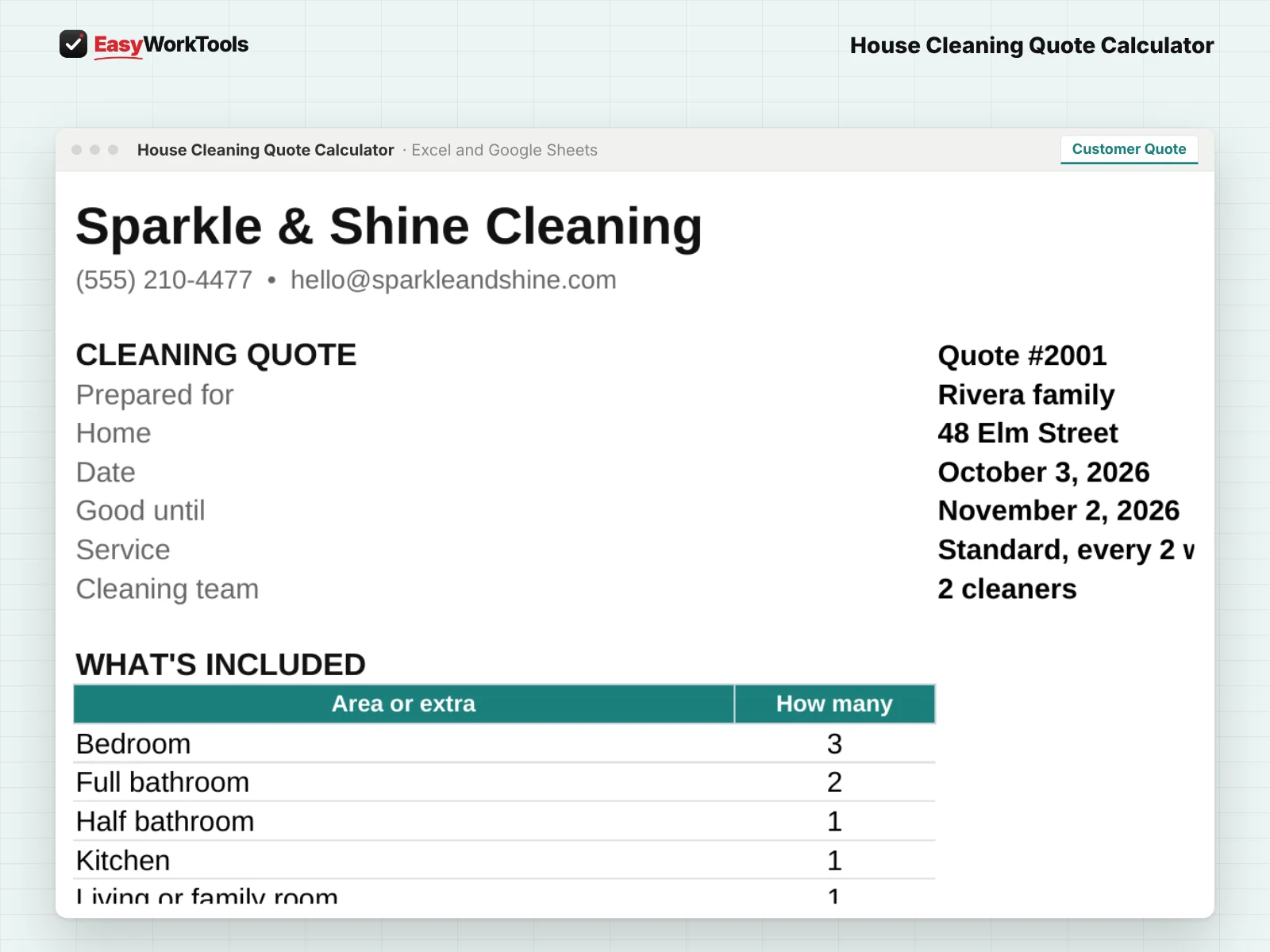
- Customer Quote lists what's included and the price. Your costs never show.
- Walkthrough is a checklist for entry, alarm, pets, off-limits rooms and the extras you agreed on. Take it to the first visit.
What the messages mean
The tool watches your numbers and tells you in plain words when something needs a look. Here's every message you might see.
What to do: Charge at least the price shown.
What to do: Nothing to fix. Your minimum is doing its job.
What to do: Type a number like 2.
What to do: Check the room count and condition.
What to do: Change How often to One-time.
What to do: Pick it from the drop-down.
Using Google Sheets or your phone
- To use Google Sheets, upload the file to Google Drive, then right-click it and choose Open with, then Google Sheets.
- Dropdowns, colors, and every calculation work the same in Google Sheets.
- On a phone, the Google Sheets and Excel apps work for quick changes. For setup and printing, a computer is easier.
- Want to start fresh? Type over the yellow example cells. Don't delete rows, since other tabs may be reading them.
Ready when you are
Like what you see? Get the home cleaning quote calculator for $19, with every future update free. Want to try the math first? The free version covers the basics, no sign-up. Need more than one tool? Save with the toolkit.
Common questions
Why does the first clean cost more?
A home that hasn't had regular cleaning takes longer to bring up to your standard. Pricing it separately keeps regular visits profitable.
Can I charge a flat price for an extra?
Yes. Enter a flat price on My Rates and it's added as-is instead of by time.
Quick reference from the Start Here tab
Welcome
Quoting a house by gut feel is how a three-bedroom with two dogs ends up paying you less than minimum wage. This calculator builds the time room by room, adjusts for condition, pets and clutter, and prices every way the client might book: one-time, deep, move-out, weekly, every two weeks or monthly. You see your profit and what each cleaner hour really earns before you say a number out loud.
Setup (About 15 Minutes, One Time)
Open 'My Rates'. Add your business info, then your costs: cleaner pay, overhead, target margin and your minimum price.
Check the room times. They're minutes for one cleaner to do a standard clean of a typical room. Time a few of your own cleans and change them. The examples are placeholders, not advice.
Look over the cleaning types, condition, pets, clutter and how-often settings. Each one changes the time, so the price follows the real work.
Open 'Supplies' and enter what you pay for your products. It works out your supply cost per visit.
New to pricing? Read 'Pricing Help' first.
Quoting A Home (About 3 Minutes)
Open 'Quote'. Enter the customer, then pick the cleaning type, how often, condition, pets and clutter.
Count the rooms: bedrooms, bathrooms, kitchen and so on. Add any extras like inside the oven or fridge.
Read the top: price per visit, profit and what each cleaner hour earns. Recurring homes also show the first clean price.
Open 'Price Options' to see every booking choice side by side, then print 'Customer Quote' and 'Walkthrough' for the visit.
Handy Tips
Walk the home before you quote a first or deep clean. The Walkthrough sheet keeps you from forgetting entry codes, pets and off-limits rooms.
Use the Agree on the details column. Most cleaning disputes start with an extra nobody defined, like who empties the fridge.
Recurring homes stay cleaner, so regular visits take less time. That's built in, and it's why a first clean costs more.
Using Google Sheets? Upload this file to Google Drive and open it with Google Sheets. Everything works the same.
Your License
This file is licensed to one business, including everyone who works there. Please don't share, resell or post it online.
© 2026 EasyWorkTools. All rights reserved. easyworktools.com
Every tab
This file has 8 tabs, in this order:
- Start Here
- Quote
- Price Options
- Customer Quote
- Walkthrough
- My Rates
- Supplies
- Pricing Help