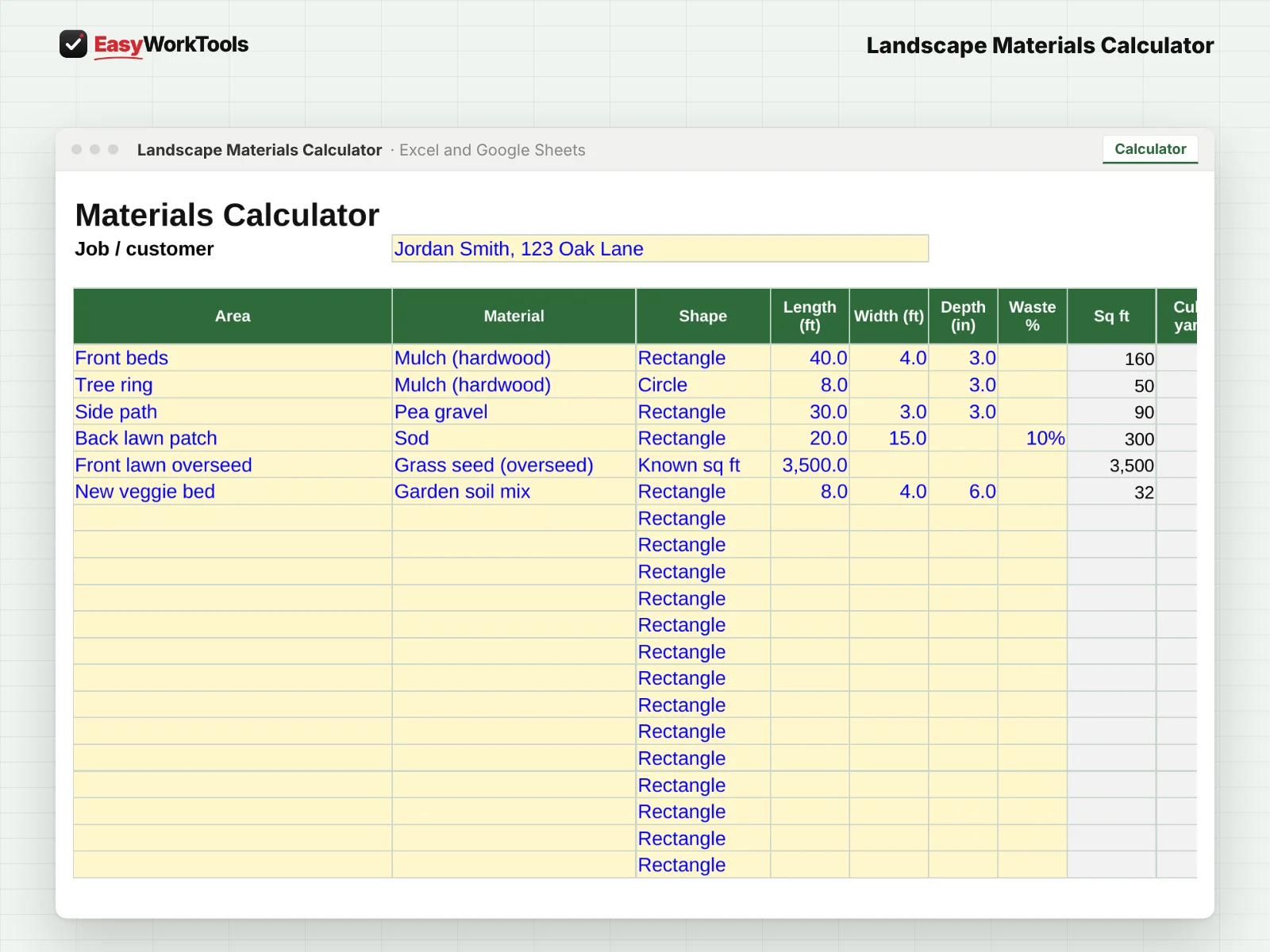
Landscape Materials Calculator Calculator tab in Excel and Google Sheets. The calculator figures every area of the job and picks bags or bulk, whichever is cheaper.
The calculator figures every area of the job and picks bags or bulk, whichever is cheaper.
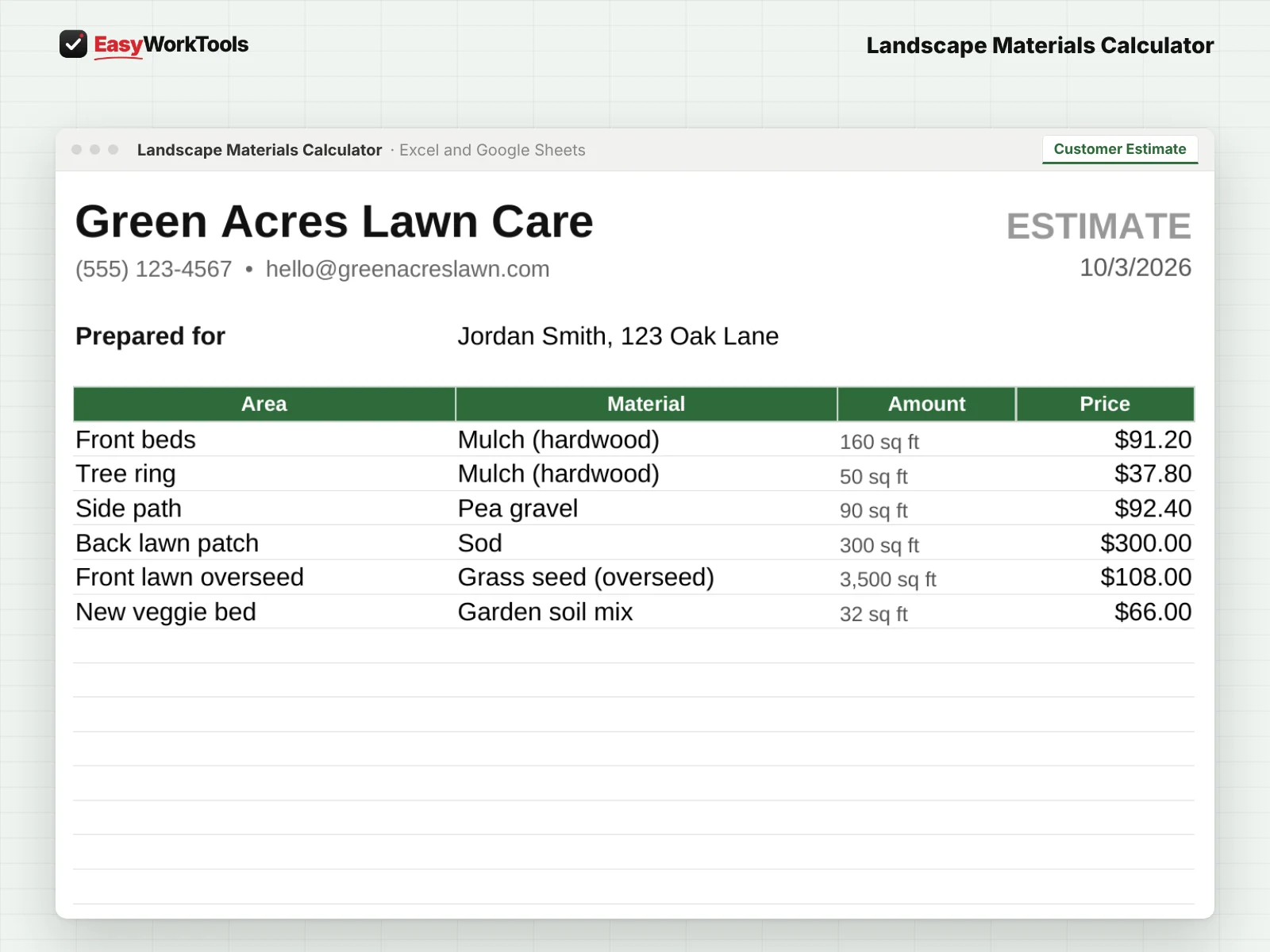
Landscape Materials Calculator Customer Estimate tab in Excel and Google Sheets. A printable customer estimate with your markup built in. Your costs never show.
A printable customer estimate with your markup built in. Your costs never show.
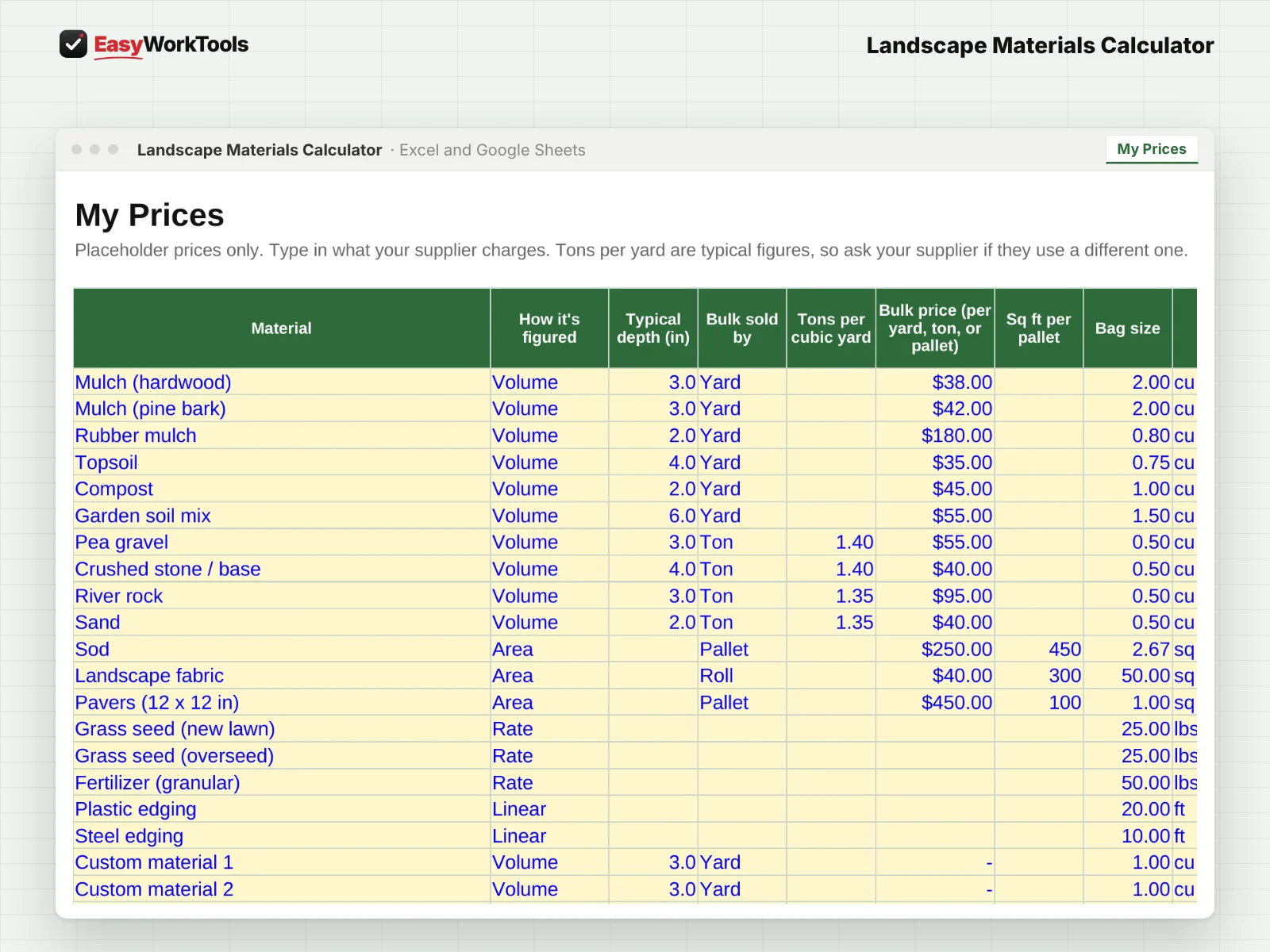
Landscape Materials Calculator My Prices tab in Excel and Google Sheets. My Prices, where you enter what your local supplier charges, once.
My Prices, where you enter what your local supplier charges, once.
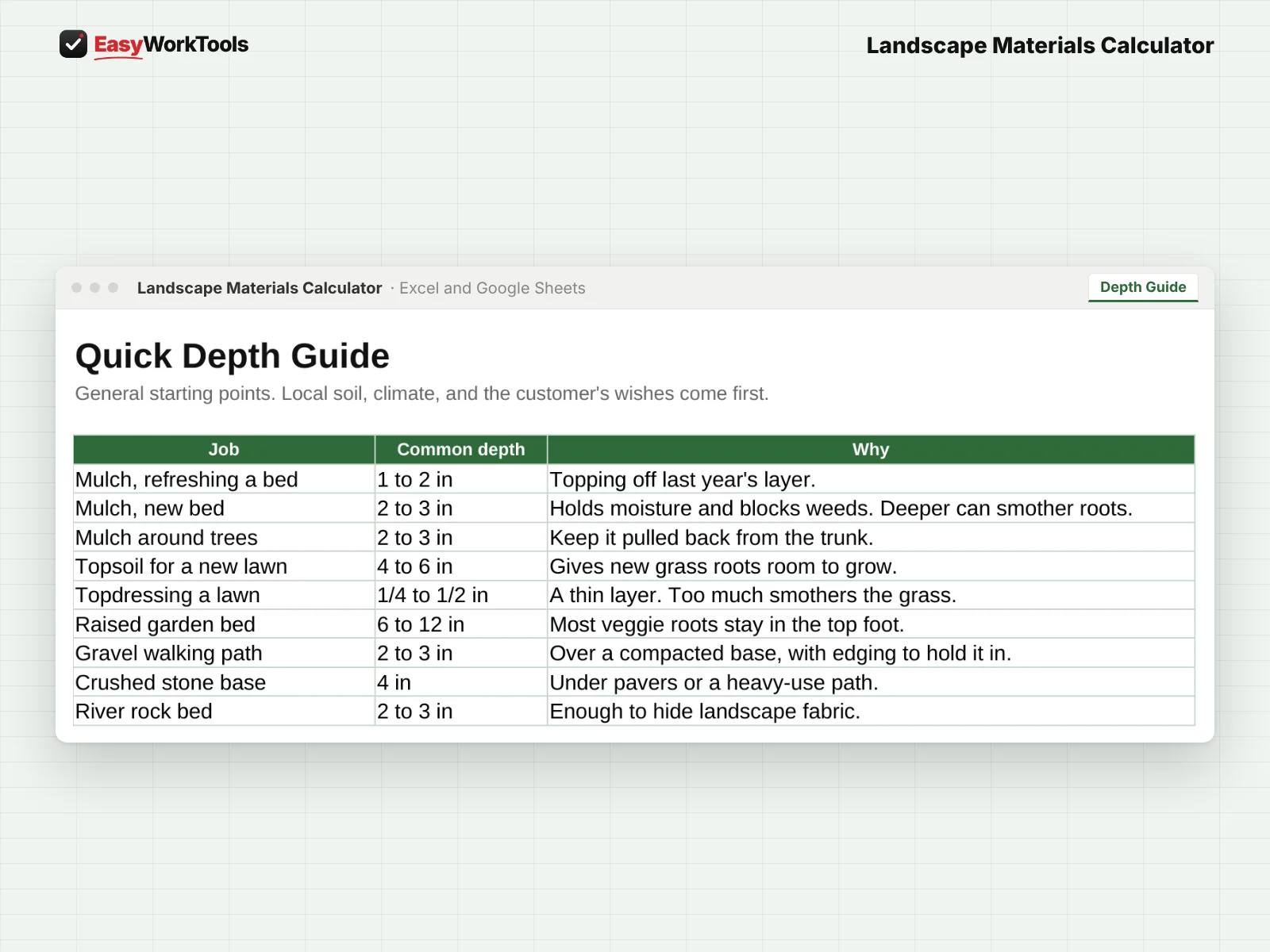
Landscape Materials Calculator Depth Guide tab in Excel and Google Sheets. A quick depth guide for beds, trees, paths, lawns, and raised gardens.
A quick depth guide for beds, trees, paths, lawns, and raised gardens.

Landscape Materials Calculator

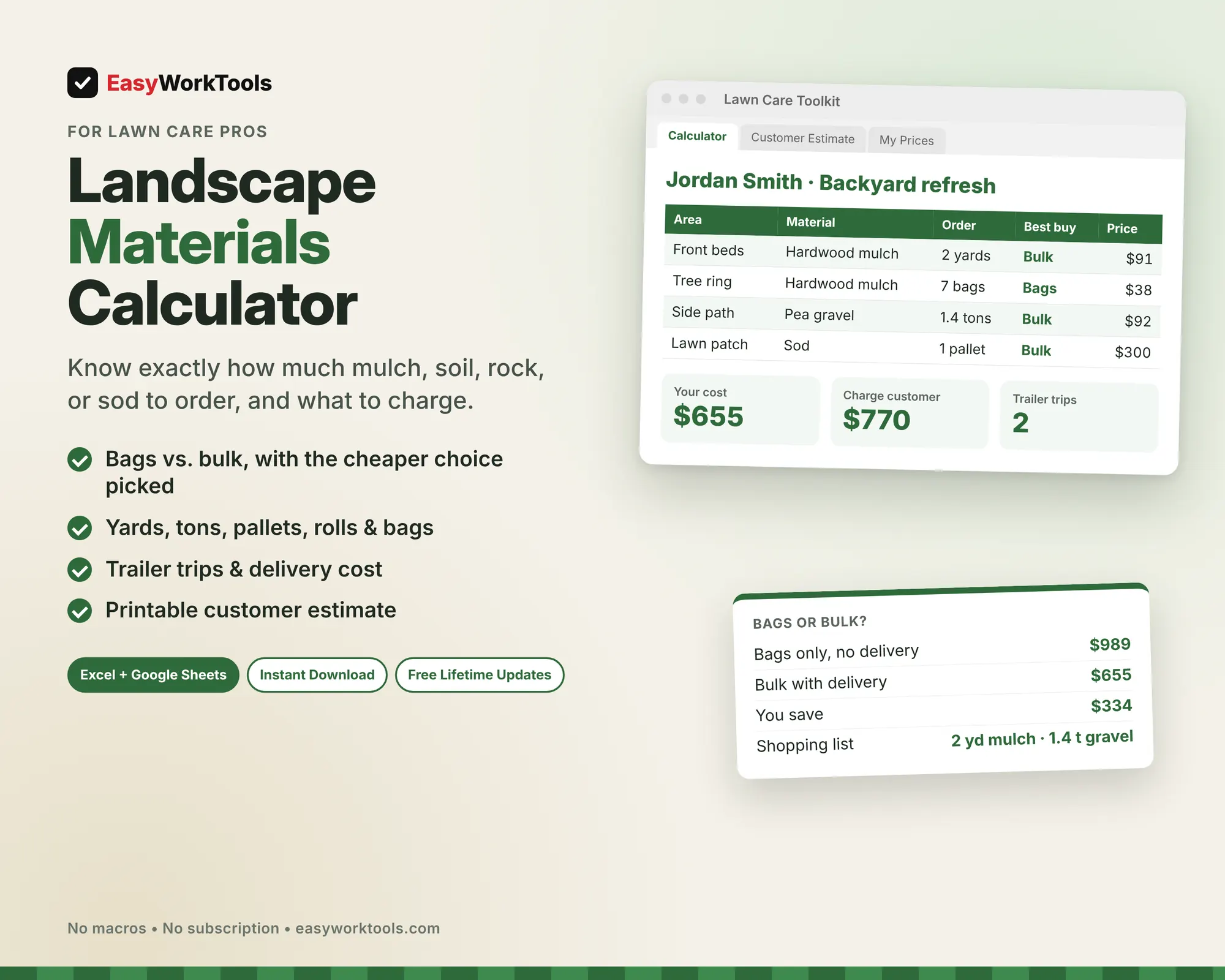
This landscape materials calculator tells you how much mulch, soil, gravel, or sod to order for every area of a job, whether bags or bulk is cheaper, and what to charge.

$9
Buy Now · $9

One payment. No subscription.

Secure checkout · Instant download

  • Instant download · Version 1.5, updated Oct 3, 2026
  • Microsoft Excel and Google Sheets
  • Example and blank copies included
  • Formulas locked against accidents
  • Free Lifetime Updates
  • See how it works before you buy

Inside

Start HereCalculatorCustomer EstimateMy PricesDepth Guide

Our promise: if something doesn't work as described, tell us within 30 days. We'll fix it, or refund you. Refund policy

What this solves

You eyeballed 6 yards of mulch for a bed job. It took 9. That's a second trip, a second delivery fee and an afternoon gone.

Without the tool"Six yards should cover it."

Your numbers, with the Materials Calculator

Bed area960 sq ft
At 3 inches deep8.9 yd
Order9 yards

Priced with your markup, before you load the truck.

Example numbers. Yours come from your own rates and costs.

Free online calculators do one material at a time and stop at cubic yards. Real jobs have five areas, three materials, a delivery fee, and a customer waiting on a price. This tool handles the whole job at once.

What the Landscape Materials Calculator does

  • Up to 20 areas per job: rectangles, circles, triangles, or a known square footage
  • 19 materials ready to go, from mulch, topsoil, and gravel to sod, pavers, seed, and edging, plus 6 slots for your own
  • Fills in a typical depth for you, and lets you change it
  • Converts to what suppliers actually sell: half yards, tons, pallets, rolls, bags, and pieces
  • Compares bags vs. bulk on every line and picks the cheaper one
  • Counts trailer trips if you haul it yourself
  • Adds your markup and sales tax, and builds a shopping list grouped by material
  • Printable customer estimate with your business info. Your costs never show on it.

What's inside

5 tabs: Start Here, Calculator, Customer Estimate, My Prices, Depth Guide.

Who it's for

Lawn and landscape pros who quote bed refreshes, paths, sod patches, and overseeding, and want to stop guessing at the supply yard.

What you get

Two spreadsheet files (.xlsx): one filled with examples so you can see exactly how it works, and a blank copy ready for your business. For Microsoft Excel and Google Sheets. No macros, no subscription. Tested against 26 real-world situations.

The formulas are locked, so a stray keystroke can't break them. You only type in the yellow cells.

Questions

Do I enter my own prices?

Yes. Type in what your local supplier charges, once, and every job uses it.

Does it handle tons for rock and soil?

Yes. It converts yards to tons, and you can change the weight per yard.

Is there a blank version?

Yes. Every download has two files: one filled with examples so you can see how everything works, and a blank copy ready for your own business. Your rates and settings come filled in as a starting point, so change them to match yours.

Can I change the formulas?

The gray formula cells are locked so they can't be erased by accident. If you really want to change one, open Review in Excel and choose Unprotect Sheet. There's no password.

Does it work in Google Sheets?

Yes. Upload the file to Google Drive and open it with Google Sheets. Everything works the same.

How do Free Lifetime Updates work?

Whenever we release a new version, you can download it free from your account, forever. We'll email you when there's something new.
Always getting better

Every EasyWorkTools spreadsheet is complete, tested and ready to run your business the day you buy it. Then it keeps getting better. We're perfectionists, so we're always sharpening our tools, and some of our best upgrades start with a customer saying "it would be great if..."

Tell us what would make a tool even better for your business, or what tool you wish existed. If it helps you, it probably helps others too.

  1. You tell us what's slowing you down.
  2. We build and test it the same way as every release.
  3. You get it free in the next update, with an email when it's ready.

  • Excel + Google SheetsWorks in both, no macros
  • Instant downloadStart using it in minutes
  • Free Lifetime UpdatesEvery new version, free
  • Locked formulasExample and blank copies